Running AI Inside Your Browser: The Built-in AI APIs
Your browser now ships a language model. Chrome and friends expose on-device AI through a family of built-in APIs backed by a small local model, so inference can run entirely on the machine — private, free, offline, and low-latency. It's not here to replace GPT; it's a new tier you route the easy jobs to.
- #ai
- #browser
- #on-device-ai
- #web-platform
- #gemini-nano
- #frontend
Here's a claim that would have sounded unhinged two years ago: you can now run a language model with zero API keys, zero network calls, and zero dollars per token — from a <script> tag. No fetch to OpenAI, no server, no bill. Just a browser API that hands you a model that's already sitting on the user's machine.
That's the pitch of the built-in AI APIs. Chrome (and, increasingly, other browsers) ships a small language model — Google's Gemini Nano — down to the device, and exposes it through a set of JavaScript APIs. When your code calls one, the inference happens locally. The prompt never leaves the laptop. The response comes back without a single packet crossing the network.
Once you internalize that, a lot of features you'd previously have dismissed as "too expensive to run on every keystroke" or "can't, privacy" suddenly become a few lines of JavaScript. Let's look at why local inference changes the math, what the API family actually looks like, and — the part everyone skips — where it falls flat on its face.
Why "on the device" is the whole story
Every time you call a cloud LLM, the same chain of events plays out. Your user's text leaves their machine, travels to a server you don't own, gets run through a model, and the answer travels back. That chain buys you a genuinely powerful model. But it also buys you four bills you might not want to pay.
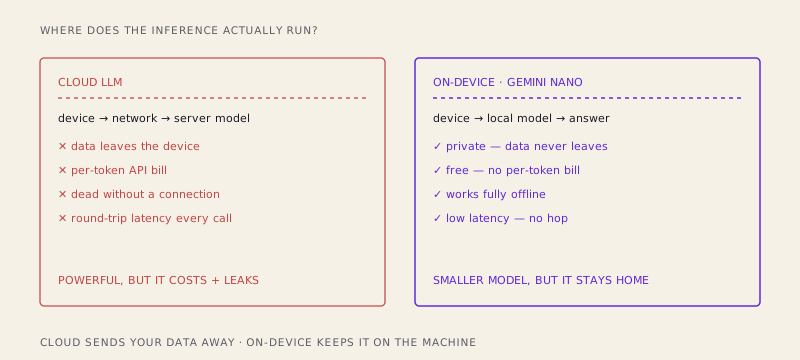
Run the model on the device and all four bills go to zero at once:
- Privacy. The data never leaves. For a "summarize this private note" or "clean up this half-written email" feature, that's not a nice-to-have — it's the difference between shippable and a compliance meeting.
- Cost. There's no per-token meter. You can run inference on every keystroke, on every item in a list, on background tabs, and your invoice doesn't move.
- Offline. A subway, a plane, a dead conference-center Wi-Fi — the model still works, because it's already there.
- Latency. No round trip. For small tasks the answer starts appearing almost immediately, because you skipped the slowest part: the network.
None of this is magic. It's just where the computation happens. Move it from a datacenter to the navigator and the entire cost structure of the feature flips.
The API family: one model, many doors
You don't talk to Gemini Nano directly. The browser wraps it in a family of APIs, and picking the right one is most of the skill.
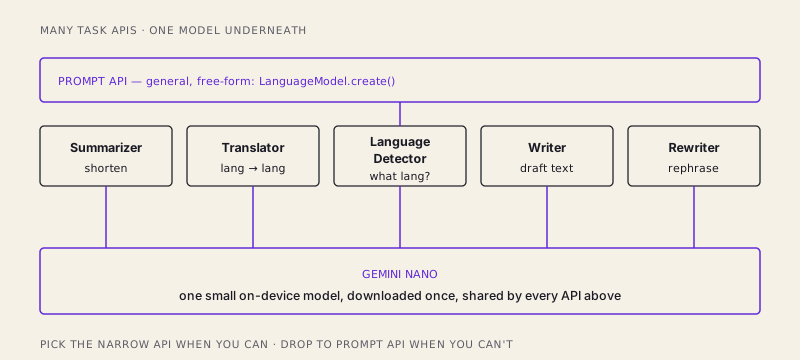
At the bottom is the general Prompt API — free-form, you send text (and, increasingly, images or audio) and get text back. It's the "I'll do whatever you describe" door:
// Always check first — availability is not guaranteed.
const availability = await LanguageModel.availability();

if (availability !== "unavailable") {
  const session = await LanguageModel.create({
    initialPrompts: [
      { role: "system", content: "You are a terse, friendly assistant." },
    ],
  });

  const reply = await session.prompt("Give me three name ideas for a coffee app.");
  console.log(reply);
}
On top of that sit the task-specific APIs, each a purpose-built door for one common job:
- Summarizer — turn long text into a headline, a
tl;dr, or bullet points. - Translator — translate between languages, on-device.
- Language Detector — figure out what language a chunk of text is (the natural partner to Translator).
- Writer / Rewriter — draft new text from a prompt, or rework existing text to be shorter, longer, or more formal.
The Summarizer is a good example of how little code these take:
const summarizer = await Summarizer.create({
  type: "tl;dr",
  format: "plain-text",
  length: "short",
});

const summary = await summarizer.summarize(longArticleText);
Why bother with the narrow APIs when the Prompt API can technically do all of it? Because they're tuned for their job, their options are structured instead of buried in prompt phrasing, and they give the browser room to optimize a known task. Rule of thumb: reach for the specific API when one fits, and drop to the Prompt API only when nothing else does.
The honest part: it's small, and it's not always there
Now the caveats, because a post that only lists upsides is marketing, not engineering.
The model is small. Gemini Nano is measured in a couple of gigabytes, not the hundreds you'd need for a frontier model. It is nowhere near GPT-class on reasoning, nuance, world knowledge, or long, multi-step problems. Ask it to summarize a paragraph and it shines. Ask it to debug a subtle race condition across five files, reason through a legal argument, or write a novel chapter that holds together, and you'll feel the ceiling immediately. This is a small model doing small-model things well — not a pocket-sized genius.
There's a one-time download. The model isn't shipped with the browser binary; it's fetched on demand, and it's big enough that you cannot pretend the download is instant. The very first time a user hits your feature, the model may still be arriving. Which leads to the caveat that actually shows up in your code:
Availability is gated, experimental, and must be feature-detected. These APIs are new, partly behind origin trials or flags, and only present on capable hardware. So you never assume they exist. You check — and you specifically handle the "still downloading" state, because it's a real state a real user will land in:
const availability = await LanguageModel.availability();

switch (availability) {
  case "unavailable":
    // No model on this device — fall back to a cloud call or hide the feature.
    useCloudFallback();
    break;
  case "downloadable":
  case "downloading":
    // Model isn't ready yet. Show progress; don't block the UI on it.
    const session = await LanguageModel.create({
      monitor(m) {
        m.addEventListener("downloadprogress", (e) => {
          console.log(`Downloading model: ${Math.round(e.loaded * 100)}%`);
        });
      },
    });
    break;
  case "available":
    // Ready to go right now.
    break;
}
Feature-detect, handle "unavailable," handle "downloading." If you skip that, your feature works beautifully on your machine and throws on a stranger's. That's not a footnote; it's the difference between a demo and a product.
So when do you actually use it?
The framing that makes all of this click: on-device AI is not a replacement for cloud AI. It's a new tier. You don't pick one forever — you route each task to the tier that fits it.
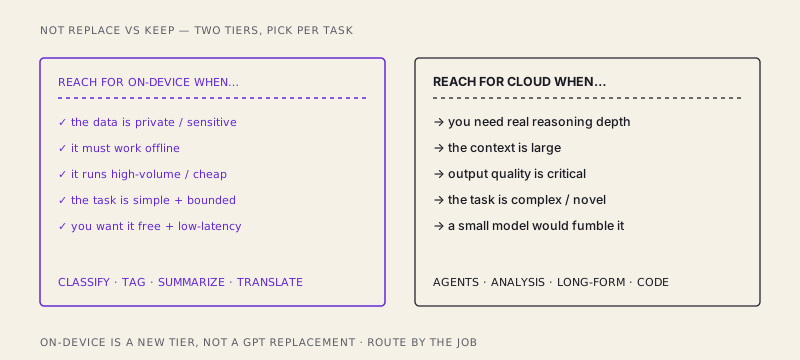
Reach for on-device when the task is:
- Private or sensitive — the data shouldn't leave the machine.
- Offline-capable — it has to keep working with no connection.
- High-volume — you're running it constantly and a per-token bill would hurt.
- Simple and bounded — classify, tag, detect language, summarize a paragraph, tidy a sentence.
Reach for the cloud when you need what a small model can't give you: deep reasoning, a large context window, genuinely high-quality long-form output, or anything complex and novel. An agent that plans across many steps, an analysis that has to be right, a code-generation task — that's still cloud territory, and pretending otherwise just ships a worse feature.
The best designs use both. On-device handles the constant, cheap, private stuff — instant language detection, an offline "summarize this page" button, a rewrite-my-sentence helper that fires on every edit — while a cloud call is reserved for the moments the user explicitly asks for heavy lifting. You get the responsiveness and privacy of local inference for the 90% of tasks that are easy, and the raw capability of a big model for the 10% that aren't.
The browser as an AI runtime
Step back and the trend line is hard to miss. The browser used to be a client: it rendered your UI and forwarded requests to servers that did the real work. Then it got a GPU (WebGPU), real threads, a filesystem, and now a language model baked into the platform, callable from plain JavaScript.
That last one is a quiet turning point. Inference — the thing we've spent two years assuming lives in someone else's datacenter behind an API key — is becoming a local capability, as ordinary to reach for as localStorage or fetch. It won't be the tier you use for everything, and it shouldn't be. But for the enormous class of small, private, high-frequency tasks, the model is now sitting right there on the device, free and offline and instant.
The browser is quietly becoming an AI runtime, not just a client. Worth building for.
/share

Kishore K Sharma
Lead Full Stack Engineer | Java · Spring Boot · Distributed Systems · AWS | Building Scalable Cloud-Native Platforms