Claude Plugins I Use as a Lead Engineer: The Stack That Actually Earned Its Place
A working list of the Claude Code plugins I keep installed across machines — what each one does, where it pays for itself, and which ones I uninstalled within a week. Not a feature tour; a working setup.
- #claude-code
- #ai
- #developer-tools
- #productivity
- #plugins
A plugin in Claude Code is a bundle: skills, slash commands, hooks, MCP servers, and subagents shipped as one installable unit. The model loads the metadata, you get new behaviour, and a chunk of your tool list lights up that wasn't there before. That's the mechanic.
The interesting question isn't what plugins exist — the registry grows weekly. The interesting question is which ones survive a month on a real engineer's machine without being a tax on context, attention, or trust. This is that list, with the reasoning for each.
I'm going to be opinionated about it. The point of this post is not "here's a directory." The point is: here is the small set I would install on a fresh laptop today, in priority order, and what each one earns its keep doing.
What a plugin actually changes about your session
Before the list — the mental model that makes the list make sense.
A plugin can ship up to five primitives, in increasing order of how much they affect a session:
- Skills — instructional content the model loads on demand. Cheap. The skill description sits in your context; the body only loads when the model decides it's relevant.
- Slash commands — named prompts the user invokes. Effectively zero cost when idle.
- Hooks — shell commands the harness runs around tool calls. Cheap for the model, but watch the wall-clock cost.
- Subagents — fork a fresh context for a sub-task. Returns a summary, not the work. Real cost: one extra model call, but saves your main context.
- MCP servers — external processes exposing tools the model can invoke. Real cost: tool definitions inflate your tool list every turn. Pick deliberately.
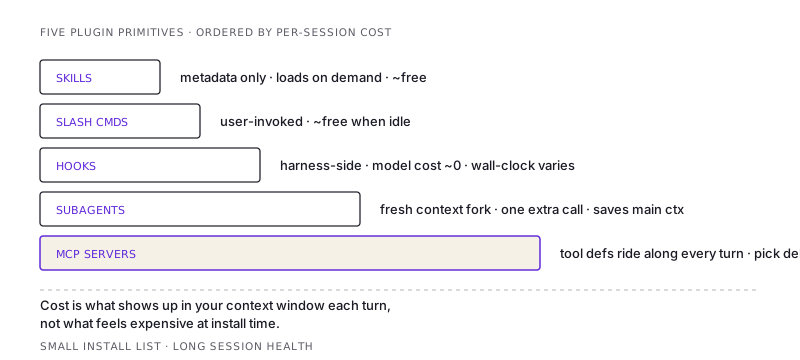
The mistake new users make is installing every interesting-sounding plugin and then wondering why the model feels slower or distracted. Each MCP server you add is a permanent tool-list bloat. Each hook is a wall-clock overhead. Be honest about whether you'll actually use the thing weekly. If not, uninstall — you can always pull it back.
The keepers, in order
1. superpowers — the discipline plugin
What it is: a meta-plugin that ships ~15 skills, the most important being brainstorming, systematic-debugging, test-driven-development, verification-before-completion, requesting-code-review, executing-plans, and using-superpowers.
Why it pays: it forces the model to not skip steps. Without verification-before-completion, models default to "I ran the tests, looks good" without actually running anything. Without brainstorming, the model jumps to implementation when you wanted to think first. Without systematic-debugging, you get speculation and not isolation.
It's the single highest-leverage install. You don't notice the value as a flashy new capability — you notice it as a reduction in the number of times you have to say "wait, did you actually run that?"
I would install this on a fresh machine before I installed git aliases.
2. caveman — token cost cut
What it is: a mode plugin. Turns on, model speaks in a compressed register. Articles drop. Filler dies. Substance stays.
Why it pays: long sessions on a project where the conversation grows. Each turn the model writes 30–50% fewer tokens of natural language without losing technical content. Across a multi-hour session, that compounds into longer effective context and lower cost. Code, security warnings, and irreversible-action confirmations stay in normal English, so you don't lose the things you'd actually want explained carefully.
The thing it gets right that other "be brief" prompts get wrong: it draws a line around what should be brief (chatter, planning, status) vs what should stay verbose (code, commits, errors, security). Most "concise mode" prompts make code comments terse too, which is wrong.
I use it any time the work is going to take more than ~5 turns.
3. A code-review plugin — the second brain
What it is: a slash command that reviews the working diff for correctness bugs and reuse/simplification opportunities. Mine is /code-review, scoped by effort.
Why it pays: a separate context, with a different prompt, looking at the same diff, catches things I miss. Not because the reviewer is smarter — because the role is different. As the author I'm looking forward (what's next). As the reviewer I'm looking backward (what's there). The author-me cannot easily be the reviewer-me in the same turn. The plugin fakes the role-switch by spawning a fresh context.
The right effort tier matters. Low for tiny changes — you want one high-confidence finding, not a parade of speculative ones. High before merging anything non-trivial — broader sweep, willing to surface uncertainty. Ultra if the change is risky and you want a multi-agent cloud review.
I run it on every meaningful diff before commit. The cost is one extra round-trip; the value is the bug-not-shipped.
4. A debugging plugin — systematic-debugging
Bundled with superpowers but worth calling out separately. What it does: forces the loop reproduce → isolate → hypothesise → verify → fix instead of "look at the error, guess what's wrong, change something, run it again."
Why it pays: most production bugs aren't where they look like they are. The "obvious" cause is often the symptom of a deeper issue. The plugin trains the model to slow down and isolate before changing code. The number of false-positive fixes I ship has dropped noticeably since I started letting it run the diagnostic instead of jumping to a patch myself.
If your normal mode is "the test is failing, let me edit the assertion until it passes," this plugin is a corrective.
5. An MCP filesystem-and-shell plugin — depends on the host
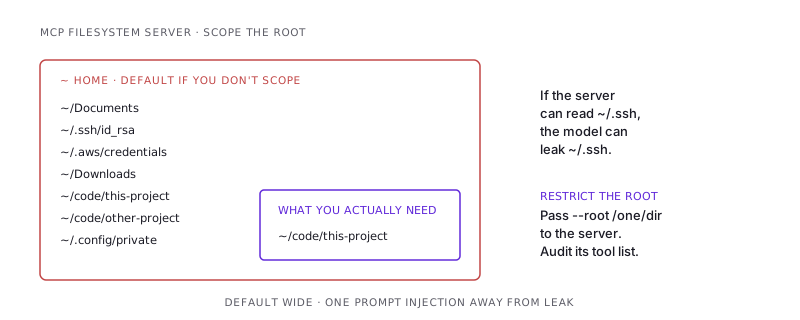
If you're on Claude Code, the built-in Read/Bash/Edit tools cover this and you don't need a filesystem MCP. If you're using Claude on the desktop app or claude.ai with MCP enabled, install a filesystem MCP server — without it, the model can't read your codebase, and every interesting workflow is gated on copy-pasting files into chat.
The configuration matters more than the choice of server. Restrict the filesystem roots. Don't expose $HOME. Audit the tool list it advertises — some servers expose a write tool you didn't realise was on.
6. A git-and-PR plugin — the boring multiplier
Slash commands for /commit, /review-pr, /finish-branch. Sometimes wired to a GitHub MCP, sometimes pure shell hooks.
Why it pays: not because the model is faster at writing commit messages than I am — but because the message it writes is the message it would have written if it explained what it just did. The shape is consistent. The body is anchored on the diff, not a vague memory of the conversation. PR descriptions come out structured.
Caveat: the model writing the commit is the same model that wrote the code. It is not an independent witness. If the diff is wrong, the message will confidently describe the wrong thing in clear English. The commit plugin is a writing aid, not a review.
7. claude-api — the spec-on-tap
What it is: a reference skill that puts the Claude API docs (model IDs, pricing, token limits, caching, tool use) in the model's reach the moment a session involves writing code against Anthropic SDKs.
Why it pays: I don't have to remember whether Sonnet 4.6's input is $3 or $3.50 per million, or whether prompt caching has a 5-minute or 1-hour TTL on this tier, or whether claude-fable-5 accepts the same tools shape as Opus. Without it, the model guesses (sometimes wrong) and I have to verify. With it, the model reads the spec and gets it right.
Niche, but if you write AI features, indispensable.
What I tried and removed
Not every plugin survives. The patterns of what gets uninstalled:
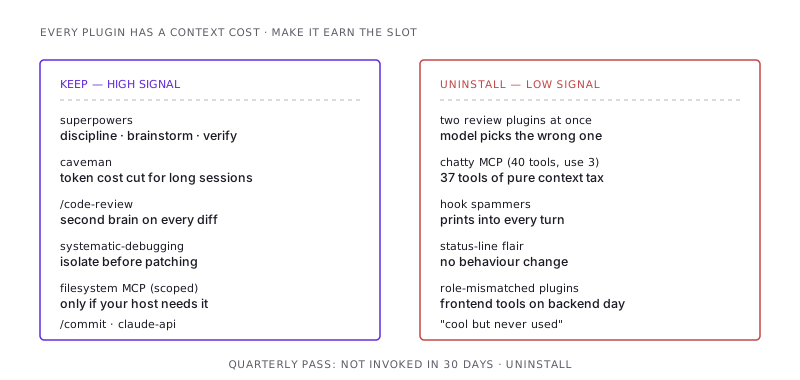
- Overlapping plugins. Two plugins both providing a "review" command and the model picks the wrong one. Pick one, uninstall the other.
- Plugins with chatty MCP servers. Tool definitions cost context. If a plugin's MCP exposes 40 tools and I use 3, the other 37 are tax. I either fork to a thinner config or remove.
- "Productivity" plugins that interrupt. Hooks that print into the transcript every turn. Status-line plugins with five colour-changing elements. Anything that adds visual noise without changing behaviour I care about.
- Plugins built for a different role. Frontend-design plugins on a backend-heavy day. Database migration plugins on a frontend-heavy day. Loading them costs metadata even if I never invoke them.
How I actually decide whether to install a plugin
The check I run, in order:
- Will I use it weekly? If no, no.
- Does it ship an MCP server with more than ~5 tools I won't use? If yes, look for a thinner alternative or scope the server.
- Does it overlap with something I already have? Pick one. Don't run both.
- Does it add a slash command I'll actually remember? A command I forget about is a command I won't use.
- Is the author's track record visible? A plugin I can't trace to a maintained source code, I treat the way I'd treat a
curl | bashfrom a random gist — installable, but only for things I'd be comfortable losing.
That's it. Five questions, applied honestly, and the plugin list stays small enough that the model isn't choosing between forty overlapping ways to do the same thing.
The meta-skill: knowing when to uninstall
Most plugin-fatigue I see comes from accretion. People install a plugin to try, never uninstall, and three months later their config is a museum of "things I thought were cool." The model has to read all of that metadata every turn. Sessions feel slower without an obvious cause.
Once a quarter, I run a clean pass. For each installed plugin: have I invoked anything from it in the last 30 days? If no, it's gone. I can always reinstall.
The same instinct that says delete dead code applies to delete dead plugins. The cost is invisible per-turn and very real per-month.
The shortlist again, if you skipped to the bottom
A fresh-machine install order, in priority:
superpowers— the discipline plugincaveman— token cost cut for long sessions- A code-review command — second-brain on every diff
systematic-debugging(bundled withsuperpowers) — diagnostic discipline- One filesystem MCP, scoped — only if your host needs it
- A commit/PR plugin — boring but consistent
claude-api— if you write AI features
Everything else, install when you have a specific reason. Uninstall when the reason goes away. The plugin list is not a trophy case.
/share

Kishore K Sharma
Lead Full Stack Engineer | Java · Spring Boot · Distributed Systems · AWS | Building Scalable Cloud-Native Platforms