Build Your First MCP Server: A Hands-On Tutorial in One Sitting
Skip the protocol theory. Build a working Model Context Protocol server in TypeScript, wire it into Claude Code, and make a real agent call a real tool in under an hour. Code, traps, and how to know it works.
- #mcp
- #ai
- #agents
- #tutorial
- #typescript
- #claude-code
Model Context Protocol theory posts are everywhere. What's missing is the make-it-work-by-lunch version: open a terminal, scaffold a server, expose one tool, see an agent call it, understand what shipped and what didn't. That's what this post is.
By the end, you'll have an MCP server that exposes a single useful tool — look up the current time in any timezone — running locally, wired into Claude Code, and being called by the model on your behalf. From that foundation you can add tools, swap transports, and start exposing real business logic. The code is TypeScript with the official @modelcontextprotocol/sdk. Java and Python SDKs are equivalent in shape if you'd rather follow along in those.
I'm going to skip protocol theory beyond what you need to follow the build. If you want the why, the MCP for Backend Engineers post covers the conceptual side; this one is the kitchen.
What you'll have at the end
A directory you can npm start that:
- Exposes one tool,
get_current_time(timezone), which returns the current time in the named timezone with proper error handling for unknown zones. - Speaks the MCP protocol over stdio (the local transport).
- Plugs into Claude Code's
mcpServersconfig and is callable from any session.
The whole thing is about 60 lines of TypeScript. The point of the tutorial is the loop — scaffold, run, register, call, debug, iterate — not the tool itself. Once that loop feels easy, swapping get_current_time for query_invoices or cancel_subscription is the same shape with more code.
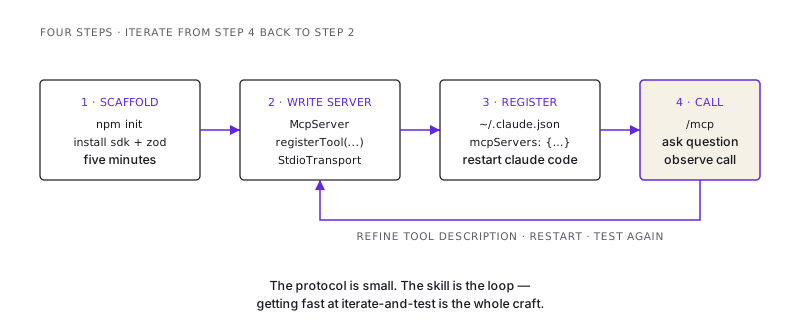
Step 1: scaffold
mkdir mcp-time-server && cd mcp-time-server
npm init -y
npm install @modelcontextprotocol/sdk zod
npm install -D typescript tsx @types/node
npx tsc --init --target es2022 --module nodenext --moduleResolution nodenext \
  --outDir dist --strict --esModuleInterop
mkdir src
package.json needs "type": "module" and a start script:
{
  "type": "module",
  "scripts": {
    "start": "tsx src/server.ts"
  }
}
That's the project. Five minutes if your npm is warm.
Step 2: write the server
src/server.ts:
import { McpServer } from "@modelcontextprotocol/sdk/server/mcp.js";
import { StdioServerTransport } from "@modelcontextprotocol/sdk/server/stdio.js";
import { z } from "zod";

const server = new McpServer({
  name: "time-server",
  version: "0.1.0",
});

server.registerTool(
  "get_current_time",
  {
    description:
      "Get the current wall-clock time in a given IANA timezone. " +
      "Returns ISO 8601 with offset. " +
      "Use this when the user asks 'what time is it in X' or needs to convert a time across regions. " +
      "Do NOT use this for durations or relative-time math — use only for the current instant.",
    inputSchema: {
      timezone: z
        .string()
        .describe(
          'IANA timezone name, e.g. "America/New_York", "Asia/Kolkata", "UTC". Case-sensitive.'
        ),
    },
  },
  async ({ timezone }) => {
    try {
      const now = new Intl.DateTimeFormat("en-US", {
        timeZone: timezone,
        dateStyle: "full",
        timeStyle: "long",
      }).format(new Date());

      return {
        content: [
          {
            type: "text",
            text: `Current time in ${timezone}: ${now}`,
          },
        ],
      };
    } catch (err) {
      return {
        isError: true,
        content: [
          {
            type: "text",
            text:
              `Unknown timezone "${timezone}". Use an IANA timezone name like ` +
              `"America/New_York" or "Asia/Kolkata". Full list: ` +
              `https://en.wikipedia.org/wiki/List_of_tz_database_time_zones`,
          },
        ],
      };
    }
  }
);

const transport = new StdioServerTransport();
await server.connect(transport);
Three things here are worth dwelling on because they're the difference between an MCP tool the model uses correctly and one that misfires:
The description is the API. Notice it tells the model what the tool does, what input format it wants, and what not to use it for. "Do NOT use this for durations" prevents the model from reaching for this tool when the user asks "how long until..." That negative guidance saves a class of misuse and costs you ten words.
The input schema uses
.describe(). The schema isn't just validation — the description shipped on each parameter is what the model reads when deciding what to pass."timezone: a string"is a 50/50 chance the model passes "Eastern" or "EST" instead of "America/New_York". The example list in the description fixes that.Errors are instructions, not error codes. The unknown-timezone branch doesn't return
{ error: "invalid" }— it returns the fix. The model reads the message and either corrects the input or surfaces a useful explanation to the user. Generic4xxerror semantics don't translate; the model needs natural language for the recovery path.
Test the server runs without crashing:
npm start
# (the server waits for an MCP client on stdio — Ctrl-C to exit)
You won't see output. The server is correctly silent — it's waiting for a client to speak protocol to it on stdin.
Step 3: register with Claude Code
Open ~/.claude.json (or the equivalent in whichever Claude Code config the platform uses). Find or add the mcpServers section:
{
  "mcpServers": {
    "time-server": {
      "command": "npx",
      "args": ["tsx", "/absolute/path/to/mcp-time-server/src/server.ts"]
    }
  }
}
The path has to be absolute — relative paths break when Claude Code starts the subprocess from a different working directory. Save the file and restart Claude Code (the harness reads mcpServers at startup; a config change without a restart is invisible).
Open a new Claude Code session and confirm the server registered:
/mcpYou should see time-server listed, with 1 tool (or however many you exposed). If you see it listed but 0 tools, the server crashed on startup — check the logs.
Step 4: call it
In a Claude Code session, ask a question the model will answer with your tool:
What's the current time in Tokyo?
The model should pick get_current_time, pass {"timezone": "Asia/Tokyo"}, get back the ISO time string, and answer. If you watch carefully (or run with verbose logging) you'll see the tool call land in your server's stdio. If the model answered without calling your tool, your description didn't make it obvious enough — strengthen the "use this when..." phrasing.
Try an error case:
What time is it in Mars?
The model should pass "Mars", get the unknown-timezone error back, read the instruction, and report to you that Mars isn't a valid timezone with a hint about the correct format. If instead the model invents a result, your error wasn't instructive enough — make the error text more explicit about what to do next.
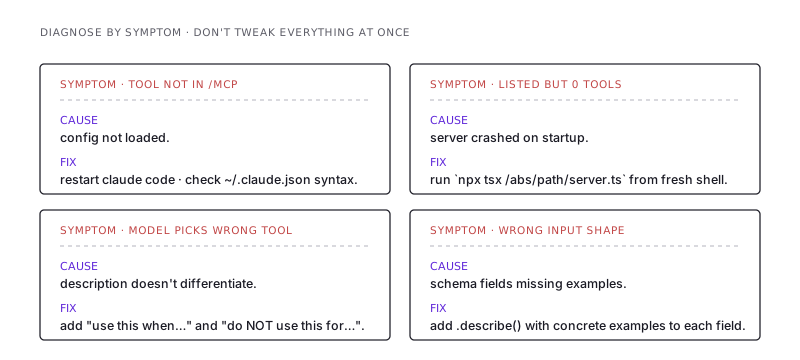
Where this breaks for new builders
In approximate frequency:
- Restart not done after config change. Edit
~/.claude.json, save, expect the tool to show up — it won't. Restart Claude Code (or use whatever reload mechanism your client supports). ThemcpServersblock is read at process start. - Relative paths in the
args. The harness starts the subprocess; CWD is not your project directory. Always absolute paths. - The server crashes silently because of a missing dependency.
npm startworks in your terminal because tsx findsnode_modules; if Claude Code starts the server from a different shell, the env might not. Test by runningnpx tsx /absolute/path/to/server.tsfrom a fresh terminal and confirming it doesn't error before adding it to the MCP config. - The model "ignores" the tool. Almost always a description problem. If the model never reaches for your tool, the description doesn't tell it when to use it. Test phrases the user might say and check whether each one triggers the call.
- The tool description and the input schema disagree. Description says one thing, schema accepts another. The model gets confused, picks the wrong shape, the call fails. Keep them in sync; the description references the schema fields by name.
What's missing from this server, and what to add next
The 60 lines above are a working MCP server. They are not a production MCP server. The gap, in priority order:
- Auth. Stdio servers run as a subprocess of the client, inheriting its privileges — fine for local dev, useless for remote. For a remote MCP server, switch to Streamable HTTP transport and add OAuth (the spec defines a flow; most production servers use it).
- Logging. Right now the server emits nothing. Add structured logs (to a file or stderr — not stdout, because stdout is the protocol stream). You will thank yourself the first time a tool misbehaves.
- Multiple tools. Add a second tool to feel out the conventions:
convert_time(from_tz, to_tz, time)is a natural companion toget_current_time. Notice how each tool needs its own description-as-API discipline. - Resources and prompts. Once you have the tools loop, layer on a
resourcesprimitive (e.g. a list of available timezones the model can read) and apromptsprimitive (e.g. a/schedule_meetingprompt that takes participant timezones and finds overlap). Each opens a different shape of agent interaction. - Rate limiting and idempotency. Same rules as a public API. The model will retry on partial failures; idempotency keys on mutating tools prevent double-execution.
The path from "I have a working MCP server" to "I have an MCP server my company would deploy" is mostly the same path that takes a toy REST API to a production REST API: auth, logs, observability, rate limits, contract discipline. The MCP-specific work is the tool descriptions and the response shapes; the rest is normal backend hygiene.
The thing this tutorial actually taught
The instructions above are correct. The skill they're a vehicle for is the iteration loop — server change, restart, ask the model, observe whether it called the tool correctly, refine the description, repeat.
That loop is what separates engineers who ship usable MCP servers from engineers who ship MCP servers the model never calls. The protocol is small; the SDK is straightforward; what takes practice is describing your tools in a way that makes the model's choice obvious. Get one server through the loop a few times and you'll have the muscle memory for every subsequent one.
That's the actual deliverable here. The time server is the excuse to run the loop. Once you can run it without thinking, you can build agent-callable surfaces for anything in your stack.
/share

Kishore K Sharma
Lead Full Stack Engineer | Java · Spring Boot · Distributed Systems · AWS | Building Scalable Cloud-Native Platforms