Nonce-Based CSP That Doesn't Break Tailwind: The Five Pieces Nobody Documents Together
Content Security Policy is the spam filter for your HTML — it tells the browser which scripts are allowed to run. The default examples don't work with Tailwind, Next.js, or third-party scripts. Here's the configuration that does.
- #security
- #nextjs
- #csp
- #performance
- #production
Imagine your browser is the bouncer at a club. By default, the bouncer is generous — anyone on the guest list (your domain) can come in, and once they're in, they can bring whoever they want with them. Your friends. Your friends' friends. That ad network's friends.
Content Security Policy (CSP) is what happens when you write the bouncer a stricter list. Only people whose names match this exact pattern get in. Nobody brings a plus-one without a separate invite.
A well-written CSP is the single most effective defense against cross-site scripting (XSS) — the class of attack where someone tricks your page into running code it shouldn't. If a script gets injected into your HTML somehow, CSP is what stops the browser from executing it.
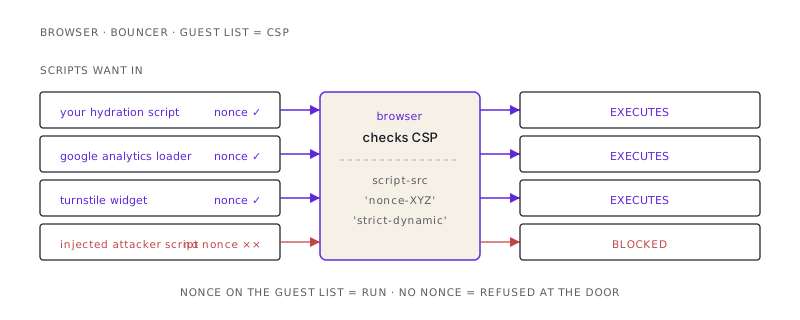
The catch: most CSP examples on the internet are written for a static site with no third-party JavaScript and no CSS framework. The moment you bring in Tailwind, Next.js, Google Analytics, or a CAPTCHA widget, the textbook CSP either blocks them or has to be loosened so much it stops being a defense.
Here is the configuration I run on this site. It's strict enough to block real attacks, lax enough to let Tailwind and third parties work, and held together by five pieces that the documentation never quite assembles in one place.
The 30-second mental model
A CSP is a header. The browser reads it, and from that moment on, it refuses to execute scripts (or load images, or apply styles) unless they match the rules.
The two relevant rules for stopping XSS are:
script-src— what JavaScript is allowed to runstyle-src— what CSS is allowed to apply
The naive permissive setting is 'unsafe-inline' for both — meaning any inline script or style is allowed. That defeats the whole purpose, because the most common XSS attack is an inline <script> tag.
The naive strict setting is 'self' only — meaning scripts and styles must come from your own domain in separate files. That blocks XSS but also blocks Tailwind (injected styles), Next.js (inline hydration scripts), and every third-party widget.
The right answer is nonces — a fresh random token, generated per page load, attached to every legitimate script. The browser only runs scripts that carry the matching nonce. Injected scripts don't have it. They don't run.
The five pieces, in order
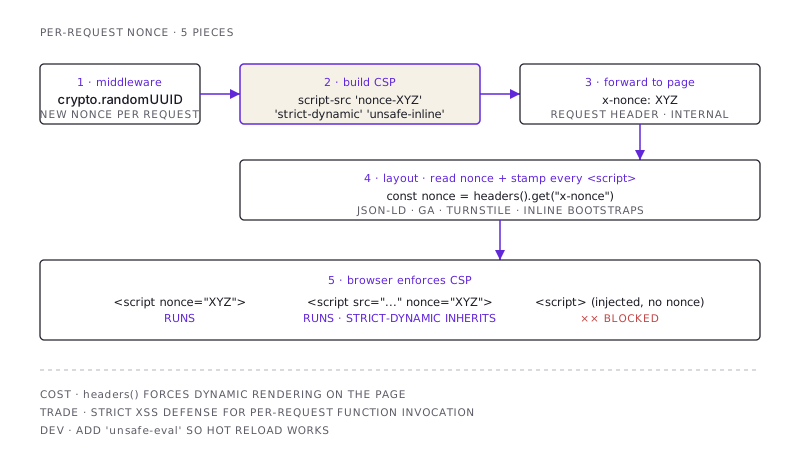
1. Generate a fresh nonce per request, in middleware
The nonce has to be different on every request. If it's static, an attacker can inject <script nonce="known-value"> and it runs. The middleware (in Next.js: middleware.ts, or proxy.ts in some setups) is the right place because it runs before any page renders.
export function proxy(request: NextRequest) {
  const nonce = Buffer.from(crypto.randomUUID()).toString("base64");
  // ...
}
Use crypto.randomUUID() or crypto.getRandomValues(). Don't use Math.random(), which is predictable.
2. Build the CSP header with the nonce inline
The CSP header is one long, semicolon-separated string. The relevant piece for scripts:
script-src 'self' 'nonce-${nonce}' 'strict-dynamic' 'unsafe-inline' https:Three things deserve attention:
'nonce-${nonce}'— only scripts with this nonce attribute will run.'strict-dynamic'— if a nonce-tagged script loads further scripts (Next's bundle, GA's loader, Turnstile), those further scripts inherit trust. Without this, you'd have to enumerate every script your scripts might load. With it, you trust the nonce and the chain it pulls.'unsafe-inline'andhttps:— fallback for browsers that don't understand'strict-dynamic'. Modern browsers ignore them when'strict-dynamic'is present. Older browsers fall back to a less-strict mode but still get some protection.
The whole script-src line, in context:
script-src 'self' 'nonce-abc123' 'strict-dynamic' 'unsafe-inline' https:That's the line that does the heavy lifting.
3. Pass the nonce from middleware to the page
This is where most tutorials wave their hands. Middleware runs before the page; the page needs to know the nonce to put it on its scripts. The bridge is a request header.
const requestHeaders = new Headers(request.headers);
requestHeaders.set("x-nonce", nonce);

const response = NextResponse.next({ request: { headers: requestHeaders } });
response.headers.set("Content-Security-Policy", csp);
return response;
Now any server component can read the nonce via headers().get("x-nonce").
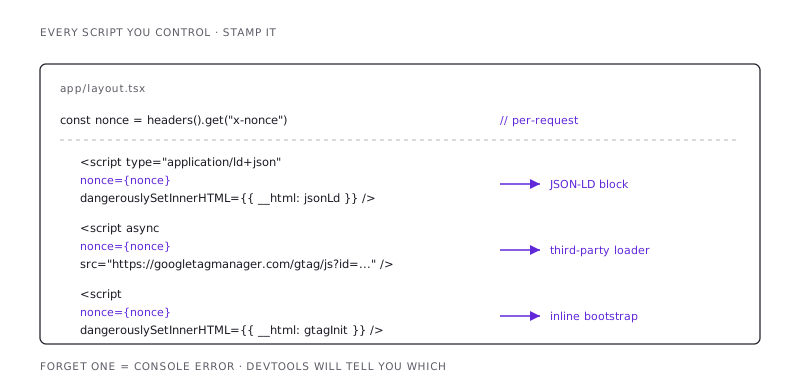
4. Stamp the nonce on every script your layout renders
In the root layout:
import { headers } from "next/headers";

export default async function RootLayout({ children }) {
  const nonce = (await headers()).get("x-nonce") ?? undefined;
  return (
    <html>
      <head>
        <script nonce={nonce} src="/somewhere.js" />
        {/* GA, Turnstile, JSON-LD blocks all need nonce={nonce} */}
      </head>
      <body>{children}</body>
    </html>
  );
}
Every <script> tag you control needs nonce={nonce}. This includes:
- JSON-LD blocks via
dangerouslySetInnerHTML - Google Analytics loader and config
- Cloudflare Turnstile, reCAPTCHA, hCaptcha
- Inline analytics or feature flags
If you forget one, that script gets blocked silently. Open devtools, check the console, it will tell you which script-src directive blocked which URL. Fix one at a time.
5. The Tailwind / styles concession
Tailwind injects critical CSS without a nonce. Next.js injects critical inline styles. Neither has good support for nonce-tagging styles. So:
style-src 'self' 'unsafe-inline'Yes, 'unsafe-inline' for styles. This is a real concession — an attacker who can inject HTML can inject <style> blocks and apply CSS. The mitigations:
- Script execution is still locked down. A pure-CSS XSS can deface your page; it cannot exfiltrate data, make network calls, or call your APIs. The blast radius is limited to "the page looks weird" rather than "the user got pwned."
- CSP doesn't have to do everything. Sanitize HTML on input. Escape on output. CSP is the last line of defense, not the only one.
I've made my peace with 'unsafe-inline' on style-src. I have not made my peace with it on script-src.
The trade-off the documentation doesn't mention
Here's the cost.
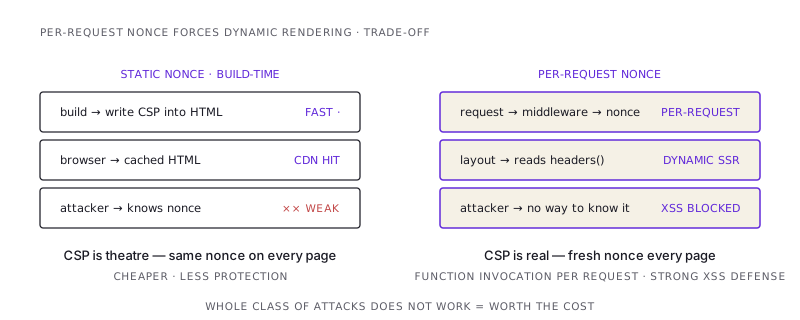
Reading headers() in a server component forces dynamic rendering. The page can't be statically pre-rendered, because the nonce changes per request. Every page render is a function invocation.
For most apps, this is fine — you were probably going to fetch something dynamic anyway. For a portfolio or marketing site that was fully static? You just gave up your static optimization.
Two ways to live with this:
- Accept the cost. It's a function invocation per request. On Vercel, that's milliseconds and a fraction of a cent. For most sites, the security gain is worth it.
- Generate a static nonce at build time. This is what some "fast" CSP implementations do. The nonce is per-build, not per-request. The CSP is weaker — an attacker who knows your nonce can inject. But you get static rendering back. Trade-off.
I take option 1. The site has the dynamic-rendering cost; XSS is the more important defense.
The dev-mode gotcha
Hot reload regenerates the nonce on every request. The browser caches the page; the cached page has an old nonce; the next page load's CSP rejects it. You see a CSP violation in the console and a broken page.
The fix is to bypass CSP in dev (NODE_ENV === 'development') or to add 'unsafe-eval' to script-src in dev only (Next's hot-reload uses eval). The production CSP stays strict; the dev one is permissive enough to not fight you.
const isDev = process.env.NODE_ENV === "development";
const csp = `script-src 'self' 'nonce-${nonce}' 'strict-dynamic' 'unsafe-inline' https: ${isDev ? "'unsafe-eval'" : ""}`;
This is the line I forget every time and remember about three minutes into trying to debug why every dev page is blank.
Putting it together
The five pieces, once more:
- Generate a fresh nonce per request, in middleware.
crypto.randomUUID(). - Build the CSP header with
'nonce-XYZ' 'strict-dynamic'forscript-src,'unsafe-inline'forstyle-src. - Pass the nonce from middleware to the page via a request header.
- Read the nonce in the layout (
headers().get('x-nonce')) and stamp it on every script you control. - In dev, add
'unsafe-eval'to script-src so hot reload works.
Test it: open devtools, look at the console. Any CSP violation tells you exactly what got blocked and which directive blocked it. Fix one at a time. When the console is clean and the page works, you have a strict CSP that lets your real app through and keeps injected scripts out.
The defense isn't free. But it stops the entire class of XSS-by-script-injection — and that is one of the few things in security where you can actually say "this whole category of attack does not work against this site."
That's a strong claim. Most security claims aren't. Take the win.
/share

Kishore K Sharma
Lead Full Stack Engineer | Java · Spring Boot · Distributed Systems · AWS | Building Scalable Cloud-Native Platforms