Passkeys Explained: Why Passwords Are Becoming Obsolete
A password is a secret you have to keep secret from everyone — including the server you have to share it with. That contradiction has been the root of every leak, phish, and reused-credential breach for thirty years. Passkeys fix it by never sending a secret at all: your device keeps a private key, the server keeps a useless public one, and phishing simply stops working.
- #passkeys
- #webauthn
- #authentication
- #security
- #fido2
- #web-standards
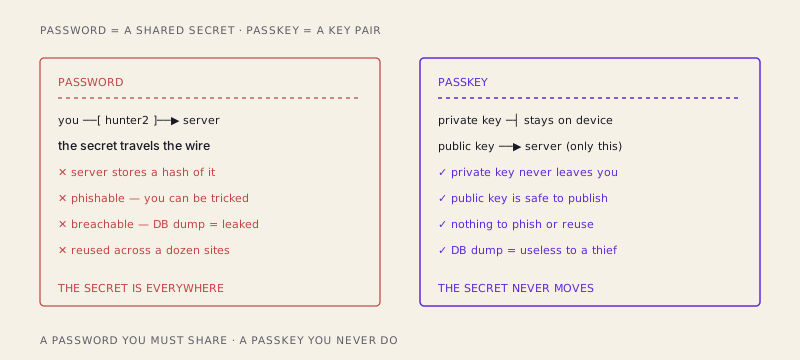
Here's a sentence that should bother you more than it does: a password is a secret you have to share. You invent something only you know, and then — in order for it to be useful — you hand it to a server, which writes it down (hopefully hashed), stores it in a database, and trusts that you'll type it back later. The one thing a secret is supposed to do, stay secret, is the one thing a password can't do, because sharing it is the entire point.
That contradiction is the root cause of basically every authentication disaster you've read about. Database dumps full of password hashes. Phishing pages that look exactly like the real login. People reusing hunter2 across forty sites so one breach unlocks their whole life. None of these are bugs in a specific app. They're all downstream of the same design flaw: the secret is shared, so it lives in too many places, and any of those places can leak or be tricked into giving it up.
Passkeys are the fix, and the fix is almost aggressively simple: stop sending a secret. A passkey is a public/private key pair — the same asymmetric cryptography that's been securing HTTPS for decades — pointed at the problem of logging in. Your device generates the pair, keeps the private key locked away where even you can't easily extract it, and hands the server only the public key. The server files that public key next to your account and, from then on, never holds anything worth stealing.
The cast: FIDO2, WebAuthn, and where the key actually lives
Two names get thrown around and it's worth pinning them down once. WebAuthn is the browser API — navigator.credentials.create() and .get() — that web pages call to make and use passkeys. FIDO2 is the broader FIDO Alliance standard WebAuthn is part of, covering the protocol between the browser and the authenticator (the thing that actually holds the key). Together they define a system where the private key is generated and used inside hardware designed to never let it out.
That hardware is the important part. On your phone it's the secure enclave; on a laptop it's the TPM; on a hardware key like a YubiKey it's the key's own chip. The private key is created inside that chip and mathematically cannot be exported in the clear. When something needs signing, the data goes into the chip, a signature comes out, and the key itself never appears in your app's memory, your browser, or the network. That's the structural difference from a password manager, which stores a secret and then hands it back to you to transmit. A passkey's private key is never handed back to anyone.
Registration: the device makes a key, keeps half of it
Signing up with a passkey is a short conversation. The server (the "relying party," in spec-speak) sends the browser a challenge — a random blob — along with some info about itself, most importantly its relying party ID, which is basically its domain: paypal.com.
Your device then generates a brand-new key pair specifically for that site. The private key goes into the secure enclave and stays there, welded to that origin. The public key, plus a credential ID (a handle so the server knows which key to ask for later), goes back to the server. The server stores those two things against your account. That's it. There is no password to hash, no secret to guard, nothing in the database that helps an attacker who steals it.
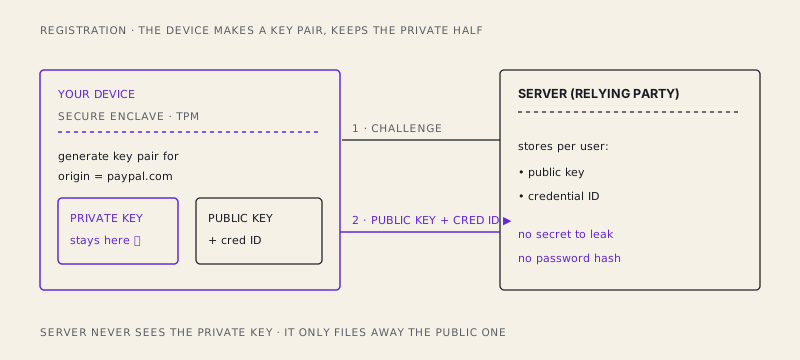
Notice what the server database looks like now. If an attacker dumps it, they get a list of public keys. Public keys are, by design, safe to publish on a billboard — they can verify a signature but can't produce one. The breach that would have been catastrophic with password hashes is a shrug with passkeys, because there's nothing there to reuse.
Authentication: sign a random number, prove it's you
Logging back in is a challenge-response, and it's where the whole thing clicks. The server sends a fresh random challenge. Your browser asks the device to sign it — but the private key won't budge until you perform a user gesture: Face ID, a fingerprint, or a PIN. That gesture unlocks the key locally, on your hardware; the biometric never leaves your device and never touches the server.
The device signs the challenge with the private key and sends the signature back. The server takes the public key it stored during registration, verifies the signature, and — if the math checks out — logs you in. At no point did a secret cross the wire. What crossed the wire was a signature over a one-time random number, useless to anyone who intercepts it, because the next login uses a different challenge.
// Authentication, roughly, from the browser's side
const assertion = await navigator.credentials.get({
  publicKey: {
    challenge: serverRandomBytes,      // fresh every time
    rpId: "paypal.com",                // the origin the key is bound to
    allowCredentials: [{ id: credentialId, type: "public-key" }],
    userVerification: "required",      // forces the Face ID / PIN gesture
  },
});
// assertion.response.signature -> sent to the server, which verifies
// it against the stored public key. No secret is ever transmitted.
Two properties fall out of this for free. There's no shared secret in flight, so there's nothing to sniff. And because each challenge is random and single-use, a captured signature can't be replayed. Compare that to a password, which is the same string every single time — capture it once and you own it forever.
Why this actually kills phishing
This is the part worth tattooing on the inside of your eyelids, because it's the property passwords could never have.
Remember that the key was generated bound to a relying party ID — paypal.com. The browser enforces that binding. When a site asks for a passkey signature, the browser checks that the site's actual origin matches the rpId the key was created for. If you land on paypa1.com (that's a one, not an L) — a pixel-perfect phishing clone — and it tries to trigger your PayPal passkey, the browser looks at the origin, sees it doesn't match, and refuses to sign. Not "warns you." Refuses. There is no dialog for the user to click through, no signature produced, nothing for the fake site to steal.
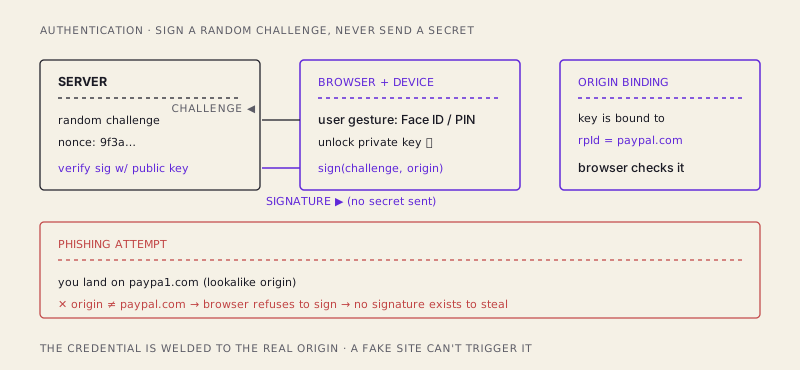
Why is this impossible with passwords? A password is just a string; you decide which site to type it into, and humans are terrible at reading URLs under time pressure. The security depended on a tired person correctly parsing paypa1.com at 11pm. Passkeys move that check from your fallible eyeballs to the browser's origin comparison, which does not get tired and does not misread a 1 for an l. Phishing doesn't get harder. For passkey logins, it stops being a thing.
Platform passkeys vs. roaming keys
There are two flavors, and the difference is where the key lives and how it travels.
Platform passkeys are stored by your operating system and synced across your devices through a provider — iCloud Keychain for Apple, Google Password Manager for Android/Chrome, and others. Create a passkey on your phone and it's there on your laptop, encrypted end-to-end in transit. This is the mainstream experience, and it's the one that makes passkeys usable for normal humans: you're not tied to a single physical device.
Roaming authenticators are hardware keys like a YubiKey. The private key never leaves the physical fob; you carry it and tap or plug it in to authenticate. Nothing syncs anywhere. This is the high-assurance option — favored by people whose threat model includes "what if my cloud account itself is compromised" — at the cost of, well, having to carry a physical object and buy a backup.
The honest caveats
Passkeys are genuinely better, and I'm not going to pretend they're frictionless.
Account recovery is the hard problem. With passwords, "recovery" was a reset email — which, notice, was always a phishable backdoor that undercut your nice strong password anyway. Passkeys force the industry to build real recovery: a second passkey on another device, a hardware key in a drawer, or a provider-level recovery flow. Set up more than one credential from day one. A single passkey on a single device is a single point of failure.
Cross-ecosystem syncing is still awkward. Apple's sync doesn't natively flow into Google's, and vice versa. It's improving, and QR-code cross-device sign-in (use your phone to log in on someone else's laptop) papers over a lot, but if you live half in Apple's world and half in Google's, you'll feel the seams.
"What if I lose my device?" is the question everyone asks, and the honest answer is: if it was a synced platform passkey, it's already on your other devices and in your provider's encrypted backup — losing the phone doesn't lose the key. If it was a lone hardware key with no backup, you're locked out, the same way you'd be locked out of a safe whose only key you dropped in the ocean. The mitigation is the same either way: register more than one authenticator.
The through-line is this: passwords weren't a good idea that got poorly implemented. They were the wrong primitive from the start — a secret you're required to share, then somehow keep secret from everyone you shared it with. Passkeys don't patch that; they retire it. The server holds something public, your device holds something that never moves, and the only "secret" left in the system is a fingerprint that never travels anywhere. Once you've logged in with a glance at your phone and no password at all, the old way starts to look less like security and more like a thirty-year-long game of hoping nobody was listening.
/share

Kishore K Sharma
Lead Full Stack Engineer | Java · Spring Boot · Distributed Systems · AWS | Building Scalable Cloud-Native Platforms