Server Actions Ate My API Layer: Six Months of Next.js in Production
What if the form just called your function — no fetch, no JSON, no route file? After six months of shipping server actions in production, here's where they win, where they don't, and how I decide which to use.
- #nextjs
- #react
- #patterns
- #fullstack
- #production
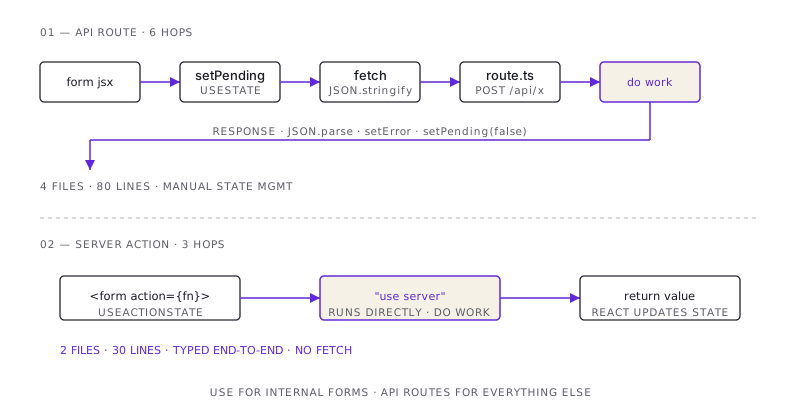
For most of my career, the deal was simple: the frontend talks to the backend through HTTP. You write a route on the server (POST /api/contact), you fetch() it from the client, you serialize, you deserialize, you handle the loading state, you handle the error state. Eight files for one form submission, more or less.
It works. It's also a lot.
Server actions are Next.js's bet that most of those eight files don't need to exist. You write a function on the server. You hand it to a <form>. The form posts directly to the function. There's no fetch in your client code, no JSON parsing, no route file. The thing that used to require an API request now looks like a function call.
I've been shipping server actions in production for about six months on this portfolio and a couple of small client projects. Here's what I've learned — what they're great at, where they bite, and the rule I now use to decide which to reach for.
The thirty-second explanation
If you haven't used them, here's what changed.
The old way:
// app/api/contact/route.ts
export async function POST(req: NextRequest) {
  const body = await req.json();
  await sendEmail(body);
  return Response.json({ ok: true });
}

// components/ContactForm.tsx
function ContactForm() {
  const [pending, setPending] = useState(false);
  const [error, setError] = useState<string | null>(null);

  async function onSubmit(e: FormEvent) {
    e.preventDefault();
    setPending(true);
    try {
      const data = new FormData(e.currentTarget as HTMLFormElement);
      const res = await fetch("/api/contact", {
        method: "POST",
        body: JSON.stringify(Object.fromEntries(data)),
        headers: { "Content-Type": "application/json" },
      });
      if (!res.ok) throw new Error("Failed");
    } catch (err) {
      setError("Something went wrong");
    } finally {
      setPending(false);
    }
  }
  // ... form JSX
}
The server-actions way:
// app/actions.ts
"use server";
export async function submitContact(_prev: State, formData: FormData) {
  await sendEmail(Object.fromEntries(formData));
  return { ok: true };
}

// components/ContactForm.tsx
function ContactForm() {
  const [state, formAction] = useActionState(submitContact, { ok: false });
  return <form action={formAction}>{/* fields */}</form>;
}
The form posts to the function. There's no API route, no fetch, no JSON. React handles the loading state through useFormStatus. Errors come back as a return value.
That's the whole pitch. It looks small. It changes a lot.
What's good (the wins)
1. The boilerplate is gone
The biggest, most immediate win is what isn't there anymore. No fetch wrapper. No JSON parsing. No serialization concerns. No error-handler middleware. The function the form calls is the same kind of function you'd write in a backend service: takes input, does work, returns output. The fact that it travels over HTTP is the framework's problem, not yours.
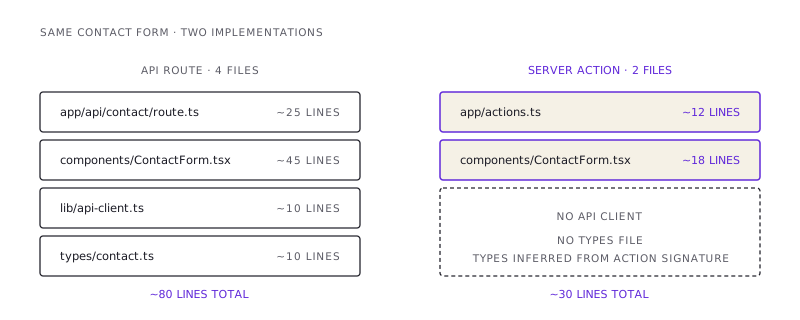
I count files. The old way: 1 route file, 1 form component, 1 API client wrapper, often a separate types.ts for request/response. The new way: 1 function, 1 form component. Half the files, usually less code in the files that remain.
2. Type safety end-to-end without codegen
If your action signature is (state: State, formData: FormData) => Promise<NewState>, the form component sees that exact type. Rename a field on the server, the client refuses to compile. No tRPC. No OpenAPI. No npm run generate-types step.
This sounds incremental. It isn't. The cost of keeping client and server types in sync is one of the silent taxes of a separated frontend/backend stack. Server actions don't pay it.
3. Progressive enhancement actually works
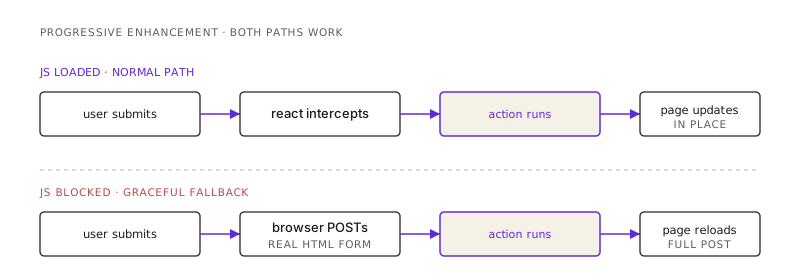
The form attribute action={formAction} is real HTML. If JavaScript fails to load — bad connection, blocked script, ad-blocker that's a little too aggressive — the form still posts. The page reloads instead of updating in place, but the action runs. The user can submit a contact form even when your client-side React is dead.
I haven't shipped a "JS-disabled" experience deliberately in years. With server actions, I get one for free. That changes my mental model of what counts as a graceful degradation.
4. Mutations live next to the data they mutate
This is the structural win nobody talks about. Server actions can sit in the same file as the page they belong to. The mutation lives next to its caller, not in a parallel /api directory tree.
// app/posts/[id]/page.tsx
export default async function Post({ params }) {
  const post = await db.post.findUnique({ where: { id: params.id } });

  async function deletePost() {
    "use server";
    await db.post.delete({ where: { id: post.id } });
    redirect("/posts");
  }

  return <DeleteButton onConfirm={deletePost} title={post.title} />;
}
Reading this, the relationship is obvious: this page renders a post, and it has a delete action. No hunting through /api/posts/[id]/route.ts to figure out what the button does.
For internal mutations on a single page, this is dramatically better than a separate route.
What's bad (the losses)
1. They're invisible to anyone outside the app
A server action isn't an API. It doesn't have a stable URL. It doesn't have a documented contract. It can't be called from a mobile app, a webhook, or a curl command in your runbook.
If you ever need to call this same logic from somewhere that isn't the same Next.js app, you have to extract it into a real API route — which means undoing some of the "boilerplate is gone" win.
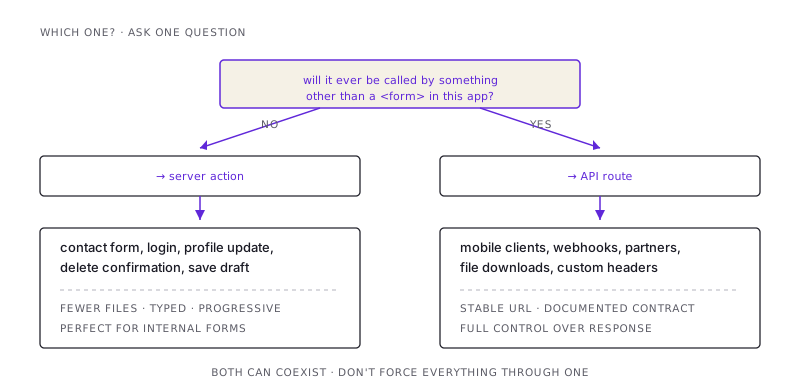
The rule I've settled on: if the operation might ever be called from outside this app, write it as an API route. Server actions are for internal forms. APIs are for everything that crosses an app boundary.
2. Caching and headers are awkward
A normal API route lets you set Cache-Control, return custom status codes, set cookies on the response. Server actions can do most of these things, but the ergonomics are worse. You're working with cookies() and revalidatePath() instead of a Response object you can shape directly.
For 90% of mutations, this is fine. For the 10% where you genuinely need to control the response — file downloads, custom redirects with specific headers, anything that bridges to a non-React client — server actions are the wrong tool.
3. Debugging is awkward
When something goes wrong with a fetch, you open the Network tab. Request, response, payload, status — all there. Server actions don't show up the same way. They serialize internally over Next's RSC protocol, which is opaque in the browser devtools.
Six months in, I still occasionally drop in a console.log on the server side because the Network tab can't tell me what payload the action received. The DX is better on the happy path and worse on the debugging path.
4. The "where is the API" problem at scale
In a small app, server actions are great. In a large app, they create a coordination problem: every team writes their own actions, they're scattered across feature folders, there's no central "API surface" to reason about.
This isn't a hypothetical. The first medium-sized app I shipped with server actions ended up with the team asking: "how do we know what mutations exist? How do we audit who can do what? How do we add rate limiting to all of them?" All of those problems have answers — a shared withAuth(action) helper, a central rate-limit middleware, a registry — but they're not free, and they're things you'd have gotten "for free" by having a centralized API layer.
If you're building a large app, you may end up rebuilding API-route ergonomics on top of server actions. At that point, ask whether you should have just written the API.
My rule, after six months
I default to server actions for internal forms with a single caller and to API routes for anything else.
The decision tree:
- One Next.js form, one user, one action? Server action. (Contact form, login, profile update.)
- Mutation needs to be called from a mobile app, webhook, or external system? API route.
- Mutation needs custom response shape (file download, specific headers, cookies-only response)? API route.
- Mutation is internal but I can already see five places it'll be called from? API route — it's becoming a service, treat it like one.
Both can coexist in the same app. They don't have to fight. Server actions for the leaves, API routes for the trunk.
The big-picture take
Server actions aren't a replacement for APIs. They're a replacement for the thin client wrapper around an API call that exists only because the form is in JavaScript. That layer was always boilerplate. Now it's gone.
Where they shine, they're transformative — the contact form on this portfolio went from ~80 lines spread across 4 files to ~30 lines in 2 files, and that's including the rate limiting and Turnstile validation. That's not a marginal improvement.
Where they don't fit, the framework gives you the API route system to fall back on. Use it. The skill is knowing which is which — and the answer almost always becomes obvious once you ask: "will this ever be called by something other than a <form> in this app?"
If yes, write the API. If no, write the action. Move on.
/share

Kishore K Sharma
Lead Full Stack Engineer | Java · Spring Boot · Distributed Systems · AWS | Building Scalable Cloud-Native Platforms