How Websites Load Before You Click: The Speculation Rules API
There is a category of page load that takes zero milliseconds, because the browser already did the work before you clicked. The Speculation Rules API is how a page tells the browser which links to prefetch or fully prerender ahead of time — turning the next navigation into an instant swap. Here's how it works, and how not to set your users' bandwidth on fire doing it.
- #speculation-rules
- #web-performance
- #prerender
- #prefetch
- #web-platform
- #frontend
Here is a load time you can't beat with a faster server, a bigger CDN, or a cleverer bundle: zero milliseconds. Not "fast." Zero. The page appears the instant you click, fully rendered, already scrolled to the top, fonts loaded, images decoded — because the browser quietly built the whole thing a few seconds ago while you were still reading the page you were on. You didn't wait for the network on click, because on click there was no network to wait for.
That's not a trick or a benchmark cheat. It's the Speculation Rules API, a real, shipping browser feature. It lets a page hand the browser a small block of JSON that says, in effect, "the user is probably going to click one of these links next — go get a head start." The browser takes it from there: it can fetch the next document in the background, or go all the way and render the next page in a hidden tab, so that clicking is just a swap. It replaces a decade of <link rel=prefetch> hacks and quirky JavaScript prefetch libraries with something the browser manages natively — and it is genuinely one of the biggest perceived-performance wins available to the web right now.
The catch is that "do the work early" is a spectrum, and the far end of it spends real money — your users' bandwidth and CPU — on pages they may never open. So this is a feature you want to understand precisely, not sprinkle everywhere. Let's take it apart.
Two speeds: prefetch and prerender
The API gives you two levers, and the difference between them is the whole story.
Prefetch fetches the document for the next URL in the background and parks it in a cache. That's it — just the HTML response, ahead of time. When the user clicks, the browser already has the bytes, so it skips the slowest, most variable part of a navigation: the round trip to your server over whatever flaky network the user is on. But the browser still has to render that document on click — parse the HTML, run the scripts, build the DOM, lay it out, paint. Prefetch buys you the network; you still pay for the render. It's cheap and it's fast, and for most links it's the right default.
Prerender goes all the way. The browser doesn't just fetch the next page — it loads and renders it, invisibly, in the background: HTML parsed, subresources fetched, CSS applied, JavaScript executed, layout done. It builds a complete, live, hidden copy of the destination. When the user clicks, there's nothing left to do. The browser swaps the finished page in. Navigation time is effectively nothing, because both the network and the render already happened. This is the zero-millisecond load.
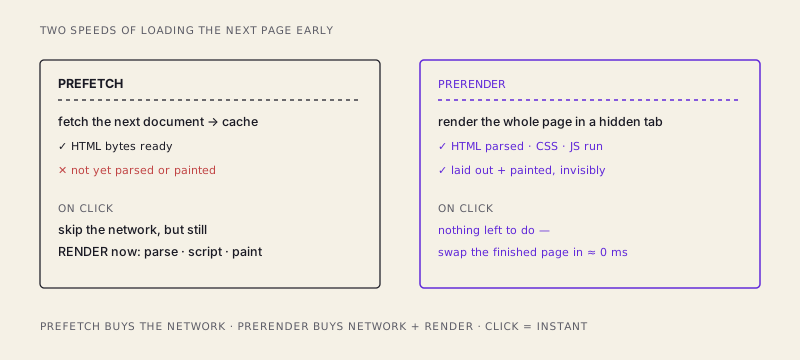
The mental model: prefetch is buying the ingredients ahead of time so you only have to cook when the guest arrives. Prerender is cooking the whole meal in advance and keeping it warm in a hidden oven — when the guest arrives, you just carry the plate out. One is dramatically faster. It's also dramatically more work to do on spec, for a guest who might never show up.
The rules, in JSON
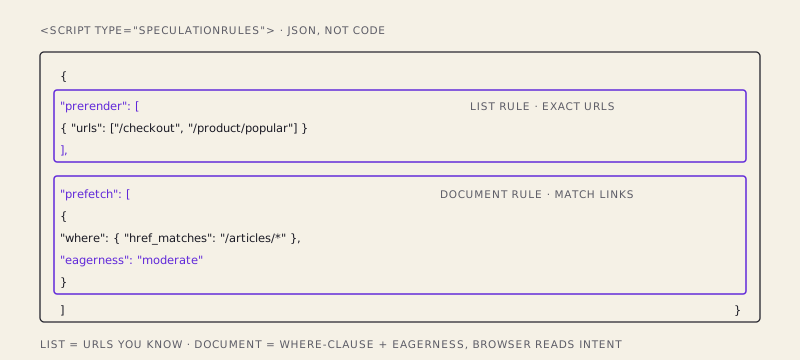
You opt in by dropping a <script type="speculationrules"> block into the page. It's JSON, not executable JavaScript — the browser reads it as a set of instructions, not code to run. There are two ways to name the targets.
The first is a plain list rule: you hand over specific URLs. This is for the pages you're confident about — the ones you know are next, like the checkout step after a cart, or the article your "read next" module is pushing hard.
<script type="speculationrules">
{
  "prerender": [
    { "urls": ["/checkout", "/product/popular-item"] }
  ]
}
</script>
The second, and more powerful, is a document rule: instead of naming URLs, you describe which links on the page qualify, with a where clause — and, crucially, you attach an eagerness that tells the browser how aggressively to act on them.
<script type="speculationrules">
{
  "prerender": [
    {
      "where": { "href_matches": "/articles/*" },
      "eagerness": "moderate"
    }
  ],
  "prefetch": [
    {
      "where": { "selector_matches": "a.nav-link" },
      "eagerness": "conservative"
    }
  ]
}
</script>
Read that out loud: prerender any link pointing at an article, moderately; prefetch any nav link, conservatively. The browser now watches those links and, based on the eagerness you set, decides when to pull the trigger — often the moment the user's pointer starts heading toward a link, or hovers, or presses down on it, all of which happen a beat before the actual click. You're not hardcoding "prerender on hover" yourself; you're telling the browser your risk tolerance and letting it read the user's intent signals for you.
Eagerness: the dial that costs money
eagerness is the most important word in the whole API, because it's the knob that decides how much of your users' data plan you're willing to gamble.
conservative— the browser only acts on a very strong signal, essentially the user starting to click (pointerdown). You barely speculate ahead at all, so you waste almost nothing, but you also only shave off a small slice of the load. Safe.moderate— the browser acts on a medium signal, like the pointer hovering over a link for a moment. A hover is a decent predictor of a click, so you get most of the speedup while only occasionally preparing a page the user drifts away from. This is the sensible middle for most sites.eager— the browser prepares links as soon as it possibly can, on the faintest hint, sometimes as the page loads. Clicks feel instant. You are also potentially fetching or fully rendering a dozen pages the user never visits, burning their bandwidth and CPU and hitting your server, for nothing.
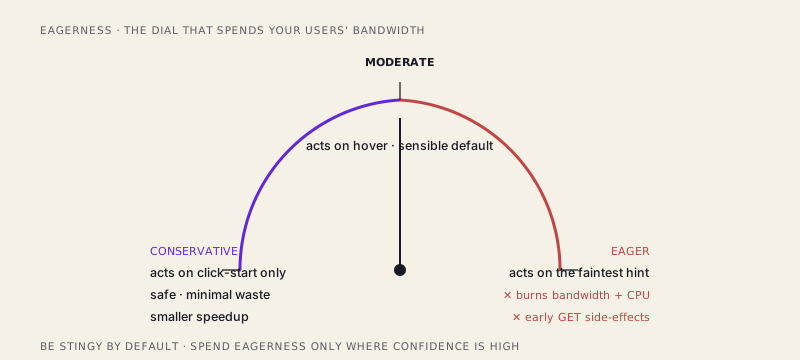
The trap is treating eager as "the fast setting" and cranking it globally. On a page full of links — a search results page, a docs sidebar, a feed — eager prerendering can spin up a stack of hidden full-page renders at once. On a phone on cellular, that's the user's data and battery, spent on your guess. The right instinct is inverted: be stingy by default, and spend eagerness only where your confidence is high. Prerender the one link you're sure about (the next checkout step) eagerly; prefetch the merely-likely ones moderately; leave the long tail alone.
The part that will bite you: side effects and analytics
Prerendering fully loads the destination page ahead of the click, and that has two consequences that catch people out.
First, it fires early. If loading that page triggers a GET that does something on your server — increments a counter, writes a "last viewed" record, consumes a one-time token, kicks off a job — the browser just did that thing for a user who hasn't actually visited yet, and might never. This is the old rule of the web, now with sharper teeth: safe, idempotent GETs only. A GET that has side effects was always a latent bug; prerendering is the thing that finally detonates it. If a page isn't safe to load speculatively, don't prerender it — or gate the side effect behind the activation, which brings us to the second problem.
Second, analytics will lie to you. A prerendered page runs your scripts in the hidden background render. If your analytics fires a pageview on load, you'll log views for pages nobody opened, and your numbers inflate. The fix is built into the platform: a prerendered page isn't considered activated until the user actually clicks and the browser swaps it in. You can detect that. document.prerendering is true while the page is being rendered in the background, and the document fires a prerenderingchange event at the moment of activation. So you defer:
if (document.prerendering) {
  document.addEventListener("prerenderingchange", sendPageView, { once: true });
} else {
  sendPageView();
}
Same idea for anything else that should only happen on a real visit — start video autoplay, log the view, begin a session timer, fire a conversion pixel — on activation, not on load. Lean on the Page Visibility API and the prerendering lifecycle rather than assuming "the page loaded" means "the user is here." With speculation in play, those two events have come apart, and code that conflated them was always quietly wrong.
Where this belongs
Speculation Rules is not a thing you turn on site-wide and forget. It's a scalpel for the navigations you can predict: the linear flows (cart to checkout to confirmation), the obvious next click (the top search result, the "next" button in a wizard, the article your layout is clearly steering toward), the hot paths in your analytics. For those, a moderate prerender turns a good load into no load at all, and users feel it as a site that's simply fast in a way they can't quite name.
For everything else — the sprawling nav, the page where the user might go anywhere — dial it down to prefetch, or to conservative, or leave it off, and let the browser spend its speculation budget where your confidence actually is. Get the eagerness right and you've moved work out of the critical moment entirely.
Because the fastest page load isn't the one you optimized. It's the one that already happened before the click.
/share

Kishore K Sharma
Lead Full Stack Engineer | Java · Spring Boot · Distributed Systems · AWS | Building Scalable Cloud-Native Platforms