Streaming LLM Responses: The Backend Engineer's Guide to Getting Tokens Out Fast
Why streaming an 8-second answer makes it feel fast even though it isn't, how to pick between long-poll, SSE, and WebSockets, and how to build a NestJS SSE endpoint that proxies a streaming LLM call — including the proxy-buffering, cancellation, and mid-stream-error gotchas that bite everyone the first time.
- #streaming
- #sse
- #nestjs
- #nodejs
- #llm
- #backend
- #spring
- #performance
Your users can't tell the difference between "fast" and "fast enough to look busy." Picture a chatbot that sits in dead silence for eight seconds and then dumps a wall of text. It feels broken. A hung process, a spinner that quietly gave up. Now take the exact same eight seconds and let the words trickle out a few at a time. Same wait, down to the millisecond. But now it feels alert, like it's leaning toward you mid-thought. Nothing got faster. You just stopped making people stare at a void.
Let me be honest up front so nobody feels cheated later: streaming is not a speedup. Your total latency is identical. The model takes as long as it takes. What changes is time to first token, the gap before the user sees anything happen, and that drops from "the whole response" to a few hundred milliseconds. You're trading a slightly worse average for a much better first impression. For anything a human reads in real time, the first impression is the only number they actually grade you on. It's a perception trick, and an honest one.
So this is the backend half of that trick. How the tokens get from the model, through a service you own, to the user's screen, and the ways that pipe leaks if you build it the obvious way the first time around.
Why streaming feels fast (and a quick reality check)
Think of a non-streaming response as a package delivery. You order it, nothing happens, then one day the whole box lands on your porch. A streaming response is a conveyor belt. The goods are identical, but you can watch them move, and "moving" is the signal a human's patience meter is actually reading.
The catch: streaming adds moving parts, not magic. You're now holding a connection open for the lifetime of the generation, you've got partial state living on the client, and you've inherited a whole new class of failure where things go wrong after you've already started sending a successful response. We'll get to all of that. But the win is real, and cheap enough, that for any user-facing LLM feature streaming is the default. Not-streaming is the choice you have to justify.
Picking a transport: long-poll vs SSE vs WebSockets
There are three ways to push generated tokens to a browser, and people reliably reach for the wrong one.
(If you only remember one thing from this section: it's SSE. Now I'll spend several paragraphs convincing you.)
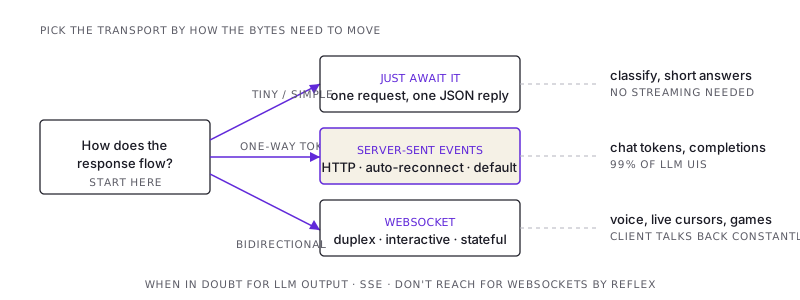
Long-polling is the old workaround. The client makes a request, the server holds it until there's data, responds, and the client immediately asks again. You can fake streaming with it, but you're paying a full request/response round trip per chunk, which is absurd at token granularity. Skip it. Its one honest use is when you're stuck behind infrastructure that won't tolerate a long-lived connection at all.
Server-Sent Events (SSE) is the right default, and it isn't close. One-way channel from server to client over a single plain HTTP response that you just never close. The server sets Content-Type: text/event-stream and writes data: ...\n\n frames as they're ready. The browser ships a built-in EventSource client that parses those frames, and here's the underrated part, it automatically reconnects if the connection drops. It's HTTP, so it walks through your existing proxies, auth, and load balancers without anyone having to think about it. For "model generates tokens, user reads them," that's the whole shape of the problem. One direction, text frames, over plain HTTP.
WebSockets are a full duplex pipe, both sides talking at once. That power is exactly why they're the wrong tool here. You don't need the client streaming bytes back mid-generation for a chat completion. The client said its piece when it hit send. WebSockets earn their keep for genuinely interactive, bidirectional, stateful flows: live collaborative cursors, multiplayer, voice where audio frames go both ways continuously. And they don't ride your HTTP stack for free. Now you're managing a separate protocol, its own auth handshake, its own reconnect logic, and its own scaling story. That's a lot of permanent surface area to buy yourself a feature you didn't need.
The compressed rule: one-way generated output, use SSE. Client needs to talk back constantly, use a WebSocket. Response is tiny, don't stream at all, just await the JSON. If you catch yourself building a WebSocket to stream a chatbot reply, stop, and use SSE.
The server side: a NestJS SSE endpoint that proxies the model
The core of it: the browser opens one connection to your service. Your service opens a streaming connection to the model provider and relays each token back out as an SSE frame. Your server is a translator sitting between two streams.
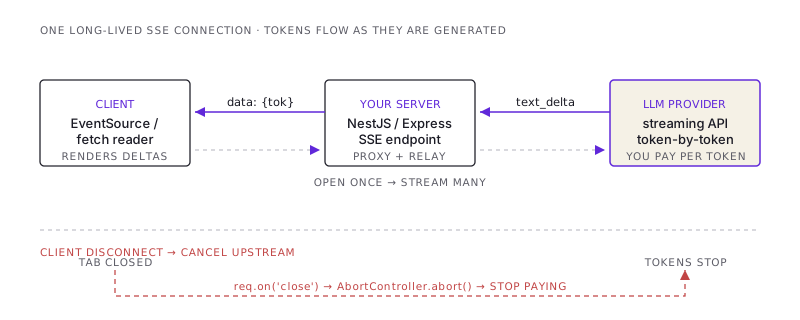
I'll reach past the @Sse() decorator and use Nest's underlying Express response directly, because proxying an LLM stream is one of those cases where you want your hands on the headers and the cancellation path. The model client here is the Anthropic SDK. client.messages.stream(...) yields content-block delta events, and we narrow to text_delta to pull out the actual token text.
import { Controller, Post, Body, Req, Res } from '@nestjs/common';
import { Request, Response } from 'express';
import Anthropic from '@anthropic-ai/sdk';

const anthropic = new Anthropic(); // reads ANTHROPIC_API_KEY from env

@Controller('chat')
export class ChatController {
  @Post('stream')
  async stream(
    @Body() body: { prompt: string },
    @Req() req: Request,
    @Res() res: Response,
  ): Promise<void> {
    // SSE headers. The X-Accel-Buffering one is load-bearing — see below.
    res.setHeader('Content-Type', 'text/event-stream');
    res.setHeader('Cache-Control', 'no-cache, no-transform');
    res.setHeader('Connection', 'keep-alive');
    res.setHeader('X-Accel-Buffering', 'no');
    res.flushHeaders(); // get the 200 + headers on the wire immediately

    // CRITICAL: when the client goes away, we must stop the upstream call.
    const controller = new AbortController();
    req.on('close', () => controller.abort());

    try {
      const llm = anthropic.messages.stream(
        {
          model: 'claude-opus-4-8',
          max_tokens: 4096,
          messages: [{ role: 'user', content: body.prompt }],
        },
        { signal: controller.signal }, // propagate cancellation upstream
      );

      for await (const event of llm) {
        if (
          event.type === 'content_block_delta' &&
          event.delta.type === 'text_delta'
        ) {
          // One SSE frame per token chunk. JSON-encode so newlines survive.
          res.write(`data: ${JSON.stringify({ text: event.delta.text })}\n\n`);
        }
      }

      // Sentinel so the client knows generation finished cleanly.
      res.write('event: done\ndata: {}\n\n');
    } catch (err) {
      if (controller.signal.aborted) return; // client left; nothing to send
      // The 200 already went out — we can't change the status code now.
      // Signal the failure IN-BAND as a typed event the client can react to.
      res.write(
        `event: error\ndata: ${JSON.stringify({
          message: 'generation_failed',
        })}\n\n`,
      );
    } finally {
      res.end();
    }
  }
}
Forty-odd lines, and that's the whole pattern. The interesting bits aren't the happy path. They're the four comments doing the heavy lifting, each one guarding against a specific way this pipe leaks. All four get unpacked below.
If you live in the JVM world, the Spring version carries less mental overhead. A WebFlux controller method returns Flux<String> with produces = MediaType.TEXT_EVENT_STREAM_VALUE, you map the provider's streaming chunks into that Flux, and Reactor handles backpressure and connection teardown for you. The cancellation story is cleaner too. When the client disconnects, Reactor cancels the subscription, and if your upstream call is itself reactive (a WebClient streaming call), that cancellation propagates without you wiring up an AbortController by hand. Spring AI's ChatClient exposes a .stream() that returns exactly that kind of Flux, so the gap between "demo" and "production" comes down to the same gotchas wearing different syntax.
The client side: reading the frames
You can use the browser's built-in EventSource, except it only does GET and can't send a JSON body. So for a POST-with-prompt endpoint, read the stream manually with fetch and a ReadableStream reader. It's a bit more code, and in exchange you control the method, the headers, and the parsing.
async function streamChat(prompt: string, onToken: (t: string) => void) {
  const res = await fetch('/chat/stream', {
    method: 'POST',
    headers: { 'Content-Type': 'application/json' },
    body: JSON.stringify({ prompt }),
  });

  const reader = res.body!.getReader();
  const decoder = new TextDecoder();
  let buffer = '';

  while (true) {
    const { done, value } = await reader.read();
    if (done) break;

    buffer += decoder.decode(value, { stream: true });

    // SSE frames are separated by a blank line. A network chunk may carry
    // a partial frame, so split on the delimiter and keep the remainder.
    const frames = buffer.split('\n\n');
    buffer = frames.pop() ?? '';

    for (const frame of frames) {
      const eventLine = frame.match(/^event: (.+)$/m)?.[1] ?? 'message';
      const dataLine = frame.match(/^data: (.+)$/m)?.[1];
      if (!dataLine) continue;

      if (eventLine === 'error') throw new Error('stream errored mid-flight');
      if (eventLine === 'done') return;

      onToken(JSON.parse(dataLine).text);
    }
  }
}
The one line people skip and then lose an afternoon to is buffer = frames.pop(). TCP does not respect your frame boundaries, and why would it. A single reader.read() can hand you two and a half SSE frames, and the next read hands you the missing half. Parse each network chunk directly and you'll get random JSON.parse errors under load, the kind that vanish the moment you test locally because local chunks happen to land on clean boundaries. Good luck reproducing that one on your laptop. Buffer it, split on the \n\n delimiter, and carry the incomplete tail forward to the next read.
The gotchas that bite everyone
1. A proxy buffering your stream into a single blob
This is the rite of passage. It works perfectly on localhost, you deploy behind Nginx, and the response suddenly arrives all at once after the full generation finishes. The exact wall of silence you set out to kill, now reincarnated in production. The streaming itself is fine. A proxy in the middle is buffering your stream, sitting on the whole thing before it forwards a single byte.
Nginx buffers proxied responses by default. The fix is the X-Accel-Buffering: no response header (set in the controller above), which Nginx reads and obeys, disabling buffering for that one response. Belt and suspenders: you can also set proxy_buffering off; in the location block. And make sure compression isn't quietly re-buffering you behind your back. Cache-Control: no-transform tells intermediaries not to gzip-and-rebuffer the stream on your behalf. The principle underneath all of this: any hop between your res.write and the browser that wants to "help" by buffering will silently defeat streaming. You have to opt out at each one, by hand.
2. The client leaves and you keep paying for it
This is the expensive one, and I mean that literally. A user fires off a long generation, reads the first sentence, decides it's wrong, and closes the tab. The browser tears down the SSE connection. If you've done nothing special, your server's for await loop is still cheerfully pulling tokens from the provider, and you're still being billed for every one of them, streaming them into a socket that hangs up the instant you try to write to it. Output tokens are the pricey ones. A few hundred abandoned generations a day adds up to real money spent on text that nobody will ever read.
The fix is the two lines flagged CRITICAL above. Detect the client disconnect (req.on('close') in Express, the subscription cancel in Reactor) and propagate that cancellation upstream by aborting the provider call. With the AbortController wired into the SDK's signal, aborting it kills the model call at the source. Generation halts, billing stops. The rule: a client disconnect has to travel all the way back to the most expensive thing in the chain. If your cancellation stops at your own server boundary, you've solved the cheap half of the problem and left the expensive half running.
3. An error that happens after you already sent 200 OK
This is the genuinely new failure mode streaming hands you, and it trips up everyone who's only ever built request/response. Your status code goes out with the very first byte. The instant you flushHeaders(), the client already has a 200 OK in hand. Now picture the model erroring out, or rate-limiting you, or the connection to the provider dropping at token 300 of 800. You cannot change the status code. It's already gone. Returning a 500 isn't an option that exists anymore, no matter how badly you want it.
So you need an in-band error signal: a distinct SSE event the client is taught to recognize, like the event: error frame in the controller. The client reads it and renders "something went wrong" instead of silently truncating mid-sentence and passing that off as the answer. This is the part teams forget, and the symptom is genuinely nasty. Responses that stop partway through with no sign anything broke, so users assume the model just gave a weird half-answer and move on with a slightly worse opinion of your product. Decide your in-band error contract early. Retrofitting it means touching both ends at once.
4. Re-rendering the whole UI on every single token
A frontend note, because it lands in the backend engineer's lap the moment someone files "the app gets laggy during long responses." The naive client appends each token to state and triggers a re-render. At fifty-plus tokens a second, that's fifty-plus full reconciliation passes a second, and a long Markdown response with code blocks in it will turn the tab into a slideshow. The fix lives on the client: batch tokens into a buffer and flush to the DOM on an animation frame, or throttle renders to every 30 to 50ms. Worth knowing the cause regardless, because the bug report is going to say "your streaming is slow" when streaming is doing precisely what you asked and the render loop is the thing on fire.
What I'd actually tell you to do
Stream anything a human reads in real time. It's the cheapest UX win on the menu and the implementation is genuinely small. Use SSE, because it's the correct default for one-way token output, and building a WebSocket to stream a chat reply is over-engineering you'll be maintaining long after you've forgotten why. Then put your real effort into the three things that separate a demo from production: kill buffering at every proxy hop, propagate client disconnects all the way upstream so you stop paying for work nobody wanted, and design an in-band error event, because the status code is gone the moment the first byte leaves the building. Get those right and the happy path mostly writes itself. It's the unhappy paths that decide whether anyone trusts the thing.
/share

Kishore K Sharma
Lead Full Stack Engineer | Java · Spring Boot · Distributed Systems · AWS | Building Scalable Cloud-Native Platforms
/seen in production