WebGPU: The Browser Finally Gets the GPU
WebGL was OpenGL ES from the 1990s bolted into a browser tab — a giant global state machine that could only ever draw. WebGPU is a thin, modern layer over Vulkan, Metal, and Direct3D 12, and it does something WebGL never could: it runs general-purpose compute. That's why in-browser ML, physics, and data-crunching suddenly run at real speed, with no server round-trip.
- #webgpu
- #gpu
- #webgl
- #web-performance
- #wgsl
- #frontend
There is a supercomputer in your laptop and, until recently, your webpage was only allowed to use it to draw triangles. The GPU sitting a few inches from your CPU can do trillions of floating-point operations a second, and for two decades the best a browser could do with all that horsepower was shade some pixels. Anything that smelled like actual math — running a neural network, simulating a fluid, transforming a million rows — had to be shipped off to a server, because the browser had no way to say "hey GPU, run this calculation for me." WebGPU is the moment that changes. It hands JavaScript the keys to the GPU not just as a paintbrush but as a compute device, and that one shift is a bigger deal than any graphics upgrade.
Let me be precise about what WebGPU is, because "successor to WebGL" undersells it. It's a new browser API, already shipping in Chrome and rolling out across the other engines, that does two things WebGL couldn't. It renders faster and closer to the metal, and — the headline — it runs general-purpose compute on the GPU. To see why that's such a leap, you have to understand what WebGL actually was.
WebGL was a 1990s API wearing a browser costume
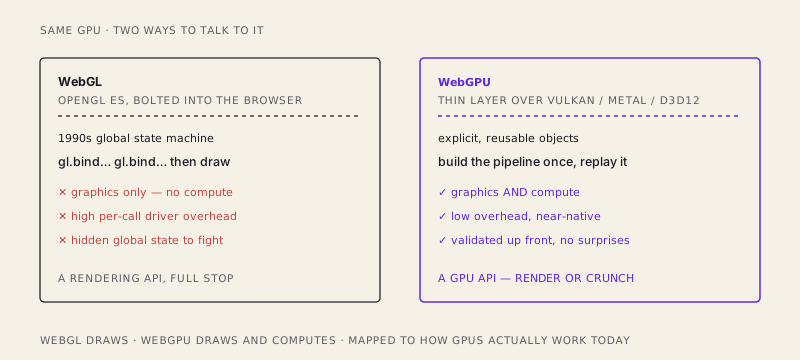
WebGL is OpenGL ES, and OpenGL is a design from the early 1990s. It's a global state machine: one giant invisible pile of settings that you mutate one call at a time. You bind a buffer, which sets "the current buffer." You bind a texture, which sets "the current texture." You flip a hundred little switches — blend mode, current shader, current this, current that — and then you say draw, and the GPU renders using whatever the global state happened to be at that instant. It's the graphics equivalent of programming with a room full of global variables that every function reads and writes.
That model was fine for a single-threaded 1995 workstation. In a modern browser it's a liability. Every one of those state-setting calls crosses from JavaScript into the driver, and the driver has to re-validate a big chunk of the world every time, because it can never be sure what you changed. It's chatty, it's expensive per call, and worst of all it can only draw. There is no OpenGL ES call that means "run this arbitrary computation and give me the numbers back." Graphics in, pixels out. That was the ceiling.
WebGPU maps to how GPUs actually work now
Native graphics moved on. Vulkan, Apple's Metal, and Microsoft's Direct3D 12 all threw out the global state machine and replaced it with explicit, pre-built objects. WebGPU is a thin, portable layer that sits on top of whichever of those the machine has. So instead of inheriting a 1990s abstraction, the browser now inherits a 2015 one — and it happens to match how the hardware really behaves.
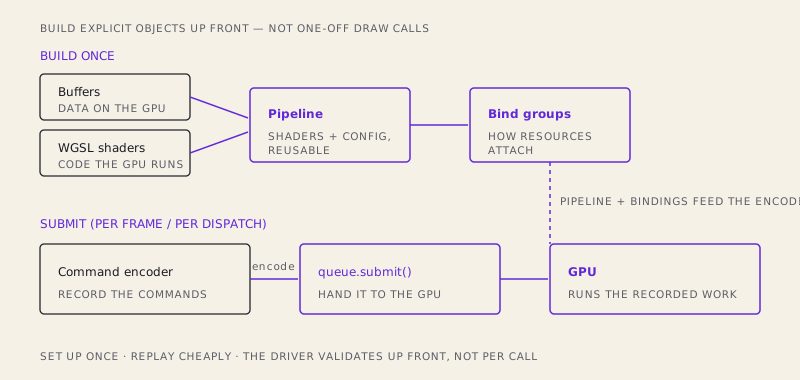
The mental model is the important part, so here it is in plain terms. You stop issuing one-off commands against a hidden global blob. Instead you assemble a few explicit objects up front, once, and then reuse them cheaply:
- A pipeline — the frozen configuration of a draw or a compute pass. Which shaders run, what the data layout is, how blending works. You build it once; it bakes in all the validation the driver used to redo on every call.
- Buffers — your actual data, living in GPU memory. Vertices, matrices, the weights of a model, a million numbers you want chewed on.
- Bind groups — the wiring that says "this buffer plugs into that slot the shader expects." A reusable description of how resources attach.
- A command encoder — you record a list of commands into it ("set this pipeline, bind these groups, dispatch this much work"), then hand the finished list to the GPU's queue with
queue.submit().
The shift is from talking to the GPU constantly to writing it a script and handing the whole script over at once. Because everything was validated when you built the pipeline, submission is cheap. The driver isn't re-checking the universe on every call — it's replaying work you already proved was valid.
The shaders themselves are written in WGSL — the WebGPU Shading Language, a small, strongly-typed, Rust-flavored language designed for exactly this. Here's a compute shader that adds two arrays together, one element per GPU thread:
@group(0) @binding(0) var<storage, read>       a: array<f32>;
@group(0) @binding(1) var<storage, read>       b: array<f32>;
@group(0) @binding(2) var<storage, read_write> out: array<f32>;

@compute @workgroup_size(64)
fn main(@builtin(global_invocation_id) id: vec3<u32>) {
  let i = id.x;
  out[i] = a[i] + b[i];   // this line runs on thousands of threads at once
}
That last line is the whole point of compute. You don't loop over the array — you launch one invocation of main per element, and the GPU runs thousands of them simultaneously. For work that's the same operation across a huge pile of data, that's a different order of magnitude than a CPU for loop.
Wiring it up from JavaScript follows the object model directly — build once, then dispatch:
const device = await (await navigator.gpu.requestAdapter()).requestDevice();

// Build the pipeline once (this bakes in all the validation).
const module = device.createShaderModule({ code: wgslSource });
const pipeline = device.createComputePipeline({
  layout: "auto",
  compute: { module, entryPoint: "main" },
});

// Record commands, then submit the whole batch to the queue.
const encoder = device.createCommandEncoder();
const pass = encoder.beginComputePass();
pass.setPipeline(pipeline);
pass.setBindGroup(0, bindGroup);
pass.dispatchWorkgroups(Math.ceil(n / 64)); // launch n threads
pass.end();
device.queue.submit([encoder.finish()]);
Notice there was no canvas, no pixels, no rendering anywhere in that snippet. That's compute — pure math on the GPU, results handed back to JavaScript.
The two wins: faster graphics, and compute that never existed
The first win is graphics, and it's the less exciting one even though it's real. Because resource management is explicit and validation happens when you build the pipeline instead of on every call, WebGPU has dramatically lower per-call overhead than WebGL. The driver isn't re-deriving state constantly; you set things up once and replay. For scenes with lots of draw calls that's the difference between smooth and stuttering, and it puts browser rendering meaningfully closer to native performance.
The second win is the one that reframes the whole platform: compute shaders. This was essentially impossible in WebGL. People faked GPU computation by encoding numbers as pixel colors, rendering them to an off-screen texture, and reading the "image" back as data — a grotesque hack precisely because WebGL only knew how to draw. WebGPU makes it first-class. You write a compute shader, dispatch it, and read real numbers back. No pretending your math is a picture.
That single capability is why a pile of things that used to demand a server now run in the tab:
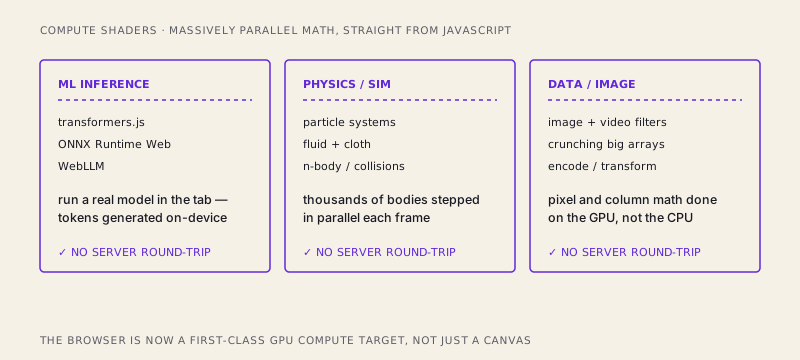
In-browser ML inference is the loudest example. Libraries like transformers.js, ONNX Runtime Web, and WebLLM lean on WebGPU to run genuine models — running a language model, embedding text, classifying an image — right on the user's device. The tokens come out of their GPU. No API bill, no network latency, no sending private data to a backend. Physics and simulation — thousands of particles, cloth, fluids, n-body gravity — get stepped in parallel every frame instead of grinding through a CPU loop. And plain data and image processing — video filters, big array math, transforms — moves onto the GPU where wide, repetitive number-crunching belongs. The common thread on every one of those cards is the same: runs client-side, no server round-trip.
The honest cost
WebGPU is not a free lunch, and pretending otherwise would set you up for a bad afternoon. It is more verbose and lower-level than WebGL. All that explicit-object machinery means you write a genuinely surprising amount of setup before your first triangle even appears — adapters, devices, pipelines, layouts, bind groups, encoders. WebGL let you flip a few switches and draw; WebGPU makes you declare your intentions in full first. That verbosity is the source of the performance (validate once, replay cheap), but it's real friction, and for a simple 2D sprite you might genuinely still want WebGL or a library that hides the ceremony.
It's also async by nature — requestAdapter, requestDevice, and reading buffers back are all promises, so you're living in await land from the first line. And support is recent. It ships in Chrome and Edge, it's arriving in Firefox and Safari, but you're still in the window where you must feature-detect navigator.gpu and keep a fallback for anyone whose browser or hardware isn't there yet.
But step back from the caveats and the shape of the thing is unmistakable. For twenty years the browser was a canvas — a surface you were allowed to paint on. WebGPU turns it into a compute device: a place you can run real, massively parallel math on hardware that was always sitting right there, doing nothing but drawing. The server round-trip for ML inference, for simulation, for heavy data work stops being mandatory. That supercomputer in your laptop finally answers to JavaScript, and not just when JavaScript wants to make something pretty.
/share

Kishore K Sharma
Lead Full Stack Engineer | Java · Spring Boot · Distributed Systems · AWS | Building Scalable Cloud-Native Platforms