ChainDrop: The npm Worm That Signed Its Own Malware
On 4 August 2026, a worm infected 444 npm packages and 2,212 versions in under four hours. Every bad version carried a valid signature. The attacker never stole an npm token — they took a GitHub account and let the maintainer's own release pipeline sign the malware. Here is how it worked, why signatures did not help, and the four settings that would have stopped it.
- #supply-chain-security
- #npm
- #ci-cd
- #security
- #devsecops
Open the lockfile of almost any JavaScript project and search for file-entry-cache. If you use ESLint, it is there. It depends on flat-cache, which depends on keyv. Three packages you never chose to install, pulled in by a linter. Three of the first four victims of the fastest supply chain attack npm has seen.
I checked my own portfolio while writing this. keyv@4.5.4, flat-cache@4.0.1, file-entry-cache@8.0.0. All safe, because the attack hit the 6.x and 11.x versions. That was luck, not care. I happened to be one major version behind.
The interesting part is not that the worm spread. Worms spread. The interesting part is that every bad version it published had a valid signature and a valid provenance record pointing at a real build in the real repository. The defence the JavaScript ecosystem spent five years building worked exactly as designed, and it made no difference.
The four hours
The timeline is precise, because everything ran through GitHub and npm and both keep logs.
- 09:02:37 UTC — a poisoned commit lands on the
keyvrepository. Pushed straight to the main branch, unsigned. - 09:35 —
keyv@6.0.0is published. About 153 million downloads a week. - 09:38 to 13:20 — the second wave. 433 more packages, 2,201 versions, published automatically using credentials the first wave had already stolen.
- 10:39 — npm starts removing the bad versions.
444 packages. 2,212 versions. Under four hours from first commit to the end of the automated wave.
Now notice what the attacker did not do. They did not steal an npm publishing token. They did not break into the registry. They took over a maintainer's GitHub account, pushed a commit and a release tag, and let the project's own release pipeline do the publishing for them.
Why the signature did not help
npm provenance is a record that links a published package to the exact commit and build that produced it. It promises one thing: this package really was built from this commit, in this repository, by this workflow.
For ChainDrop, all of that was true.
The commit was real. The repository was real. The workflow was the maintainer's own. The build ran on a genuine GitHub runner. The token used to publish was issued correctly to that workflow. The signature was honest. Anyone who checked it — and almost nobody does — would have seen a green tick.
This is worth remembering, because it changes how you should think about the whole control:
Provenance proves where a package came from. It says nothing about whether the code is safe. A signed package from a hacked source is a correctly signed piece of malware.
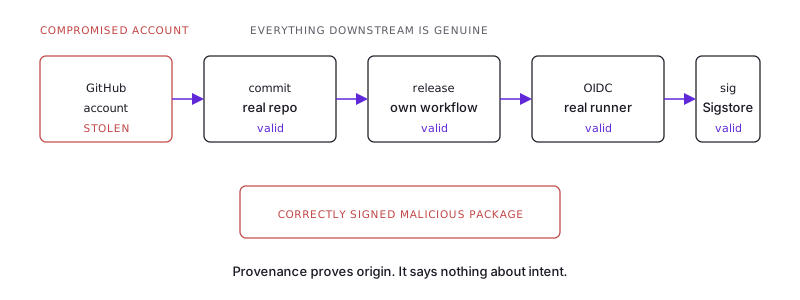
We added provenance to stop one specific attack: someone stealing an npm token and publishing a package that was never built from the public source. ChainDrop simply moved one step earlier, to the account that controls the source. At that point the signature stops being a defence. It becomes a problem, because it makes a bad package look trustworthy.
The same logic applies to your own pipeline. If an attacker can push to the branch your release job builds from, then your signing setup is now their signing setup. Signing only proves as much as the access control above it.
The package was nearly empty, and that was the point
Security scanners look inside published packages. ChainDrop published very little for them to find.
The preinstall hook — a script npm runs automatically during installation — ran a small loader file. About 30 KB in the first wave, 11 KB in the second. The loader checked which operating system it was on, downloaded the official Bun runtime from Bun's official GitHub releases page, used it to run the real payload, then deleted its working files.
That one decision defeats most network monitoring. A build machine downloading a JavaScript runtime from GitHub during an install step does not look wrong to any normal rule. Every address in the first stage belongs to a service you already trust. Security teams call this living off the land: using legitimate tools so that nothing stands out. Your network logs look clean until the point where data is sent out, which happened much later and somewhere else.
The real payload was 727 KB, wrapped in three layers of encoding and encryption. That is not there to slow down a scanner. It is there to make a human analyst's week expensive.
Reading secrets out of memory
This part should change how you think about your CI setup.
When the worm noticed it was running inside GitHub Actions, it read the memory of the runner process and searched it for anything marked as a secret. It found them all in plain text and copied them.
Every secret passed into that job was sitting in memory — every one, whether or not the current step used it.
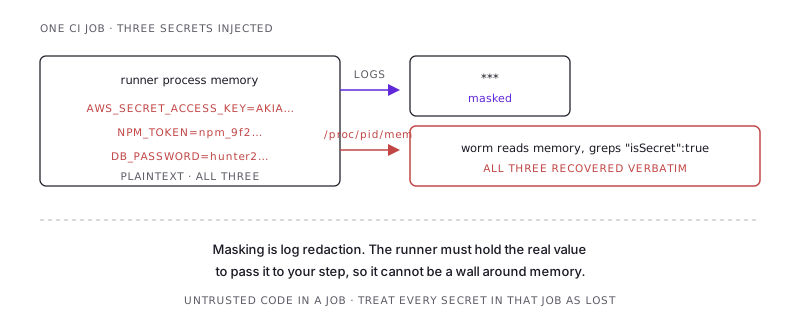
Secret masking in GitHub Actions hides secret values in the log output. It replaces them with *** on the way to the log. It was never a wall around memory, and it cannot be, because the runner has to hold the real value to pass it to your step. Many engineers have quietly upgraded "masked" to "protected" in their heads. It is not the same thing. If untrusted code runs in a job, treat every secret in that job as lost.
The worm also collected, in order of how often people forget them:
- Cloud access: AWS keys through the instance metadata service, then calls to list and read secrets across 16 regions. Vault tokens. Kubernetes access from inside the cluster.
- AI tool credentials: the config files used by Claude, Codex, Cursor and OpenAI command-line tools. A year ago this was not on anyone's list. It is now, and it should be on yours when you think about what a laptop compromise costs.
- The usual places: over 140 file locations including
~/.npmrc,~/.aws/, SSH keys, shell history, Docker configs and kubeconfigs, plus 19 search patterns for GitHub tokens, npm tokens, Google Cloud keys, database connection strings, and Stripe, Slack and Twilio keys.
How it copied itself
This is what made it a worm and not just an incident.
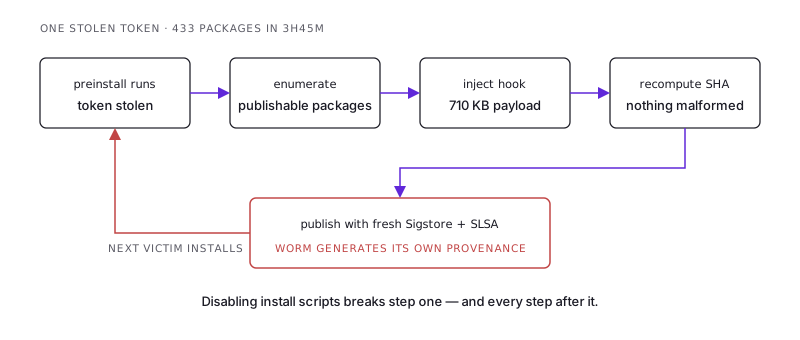
With a stolen npm token, the payload:
- listed every package that token was allowed to publish,
- downloaded each package as it currently existed,
- added the
preinstallhook and the payload, - recalculated the file checksums so nothing looked broken,
- published the new version,
- and generated a fresh signature and provenance record for it.
Step six is the uncomfortable one. The worm was not getting around the provenance system. It was using it, as a feature, so its packages looked more trustworthy than an ordinary unsigned release.
It worked the GitHub side too. It added files to victim repositories that run automatically when a developer opens the project — editor task files and AI agent settings — and committed them under an address that looked like automated tooling, so the history looked normal. It also added a workflow whose only real job was to write all the repository's secrets into a build file, which the worm collected later.
Command and control with no domain to block
The worm's control channel had nothing you could take down.
Instead of contacting a server directly, it read an address list from a smart contract on the Ethereum blockchain, using 75 different public access points. The list was encrypted. If that failed, it searched GitHub commits for a marker word instead.
This makes domain blocklists nearly useless. Block the address and the attacker updates the contract with one transaction, for a few dollars, and every infected machine picks up the new address on its next check. You cannot seize the contract. You cannot shut down Ethereum. You cannot easily block the lookup either, because it looks like normal HTTPS traffic to public services.
The channel also worked both ways. If a reply contained code, the worm ran it. Every infected machine was a live remote shell, not just a one-time credential theft.
Four settings that actually stop this
Ranked by how much they help compared to how much they cost.
1. Turn off install scripts. This is the big one.
npm ci --ignore-scriptsChainDrop's entire delivery method was a preinstall hook. With scripts off, the bad package lands on disk and does nothing. Every later stage — the Bun download, the memory read, the credential theft, the republishing — depends on that one hook running.
There is a real objection: a few packages genuinely need install scripts, usually ones that compile native code. The answer is an allowed list, not switching scripts back on everywhere. pnpm supports this directly with onlyBuiltDependencies. With npm, keep --ignore-scripts as the default in CI and rebuild the few packages that need it. For a typical web application, that list is often empty.
2. Refuse very new versions.
The bad versions were live for minutes to hours. A waiting period means your builds never see a version that young.
- npm 11.10+:
min-release-age - pnpm 10.16+:
minimumReleaseAge - Yarn 4.10+ and Bun 1.3+ have the same idea
Three to seven days. The cost is that you get fixes slightly later, and you can always override it on purpose for a security patch. Against an attack whose whole plan is move fast and get caught within the hour, a waiting period is close to a complete defence. Nobody has to make a judgement call at install time.
3. Limit what build machines can connect to.
Block outgoing connections from build machines by default, and allow only the registries and services a build actually needs. This would not have blocked the Bun download, since that is GitHub and you have to allow it. It would have blocked the step where the stolen credentials were sent out. Most teams have never restricted this at all, which means a compromised build has full internet access and a pocket full of secrets.
4. Protect the main branch, including from owners.
The first step was an unsigned commit pushed straight to main. Branch protection with required review, applied to administrators too, turns that into a pull request someone has to approve. Add phishing-resistant two-factor login — passkeys or hardware keys, not codes from an app — for every account that can push to a release branch.
These rules feel like paperwork right up to the moment they are the only thing between an attacker and your release pipeline.
Check your own lockfile
Ten seconds:
node -e "
const lock = require('./package-lock.json');
const watch = ['keyv','flat-cache','file-entry-cache','cacheable'];
for (const [path, meta] of Object.entries(lock.packages || {})) {
  const name = path.split('node_modules/').pop();
  if (watch.includes(name)) console.log(name, meta.version);
}"
Safe versions are keyv@5.6.0, flat-cache@6.1.23, file-entry-cache@11.1.5, or anything on an older major version. If you are on a bad version, pinning is not enough. Any machine that installed it with scripts enabled should be treated as having lost its credentials. Rotate npm tokens, GitHub tokens, SSH keys, cloud keys and AI tool credentials.
The part with no fix
Everything above reduces damage. None of it solves the real problem, which is that npm install runs code by design, and a normal project runs install scripts from hundreds of packages maintained by people it has never checked.
ChainDrop is not the first worm to use this, and it was far more advanced than the ones before it: trusted publishing turned into a signing service, control channels on a blockchain, secrets read out of memory, AI credentials targeted. The attacks are improving faster than the default settings are.
You cannot fix npm's trust model from your own repository. You can make your repository a much worse place to land.
The takeaway
ChainDrop did not defeat npm signatures. It inherited them. By taking the GitHub account instead of the publishing token, the attacker moved one step above the control, so every signature produced afterwards was honest about a package that was not. The general rule: signing only proves as much as the access control above it. A signature on a package from a hacked source creates false confidence rather than real safety.
The delivery method was a preinstall hook, which means npm ci --ignore-scripts stops the whole chain at step one — before the download, the memory read, the credential theft and the republishing. Add a three-to-seven day waiting period and bad versions are removed before your builds are allowed to see them. Check your lockfile today for keyv, flat-cache and file-entry-cache. If any machine installed a bad version with scripts on, treat it as a credential breach, not a version bump.
Twenty minutes of configuration buys you immunity to this whole class of attack. The next worm will be smarter than this one. Those two settings will still hold.
/share

Kishore K Sharma
Lead Full Stack Engineer | Java · Spring Boot · Distributed Systems · AWS | Building Scalable Cloud-Native Platforms
Available for contract work and remote full-time roles. See what I take on.