MCP for Backend Engineers: Why Your Internal APIs Are About to Get a Second Audience
Model Context Protocol turns your internal services into something an agent can call without bespoke glue. What MCP actually is, what it costs to expose one well, and the patterns that hold up when the caller is an LLM instead of a UI.
- #mcp
- #ai
- #agents
- #backend
- #spring-boot
- #nodejs
- #platform
For most of my career, the only callers of an internal service were other services and a couple of frontends written by people I could walk over to. I knew their request shapes. I knew what they'd retry. I could push a breaking change with a Slack message.
That model is ending. The new caller is an agent — a model with a tool list, instructions, and no patience for ambiguous error messages. Model Context Protocol (MCP) is the contract by which that agent finds your service, calls it, and reports back to whoever asked for the work.
If you maintain backend services, MCP is not somebody else's problem. The interface you expose to an agent will be the most-criticized API surface you ship next year, because every weakness in it — vague responses, missing pagination, no auth model — becomes a failure mode the model will trip over publicly. This post is what I wish someone had told me before I shipped my first MCP server.
What MCP actually is, in one paragraph
MCP is a JSON-RPC protocol that lets a client (an agent host like Claude Code, Cursor, an IDE, or a custom orchestrator) discover and invoke capabilities exposed by a server (your service, or a wrapper around it). A server advertises three things: tools (functions the agent can call), resources (named blobs of context the agent can read), and prompts (parametrized templates the agent can reuse). The transport is stdio for local servers and Streamable HTTP for remote ones. That is the whole protocol. Everything else is your problem to design.
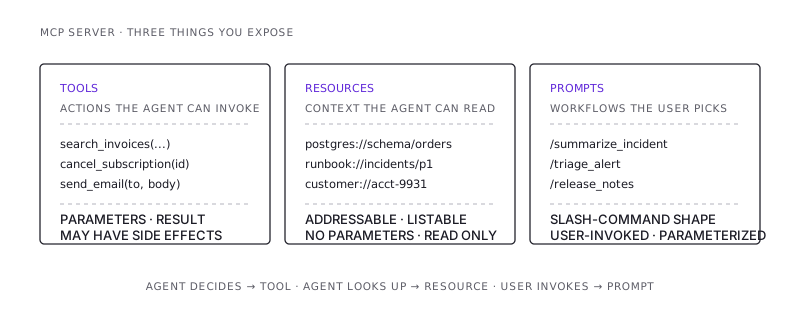
The protocol is intentionally small. The hard part isn't speaking it — there are SDKs for Python, TypeScript, Java, Kotlin, Go. The hard part is deciding what to expose, how to describe it, and what guarantees you'll commit to when the caller is non-deterministic.
Why this isn't just "your REST API with a sticker on it"
The first instinct, looking at an MCP server, is to map every existing endpoint to a tool and ship it. Resist.
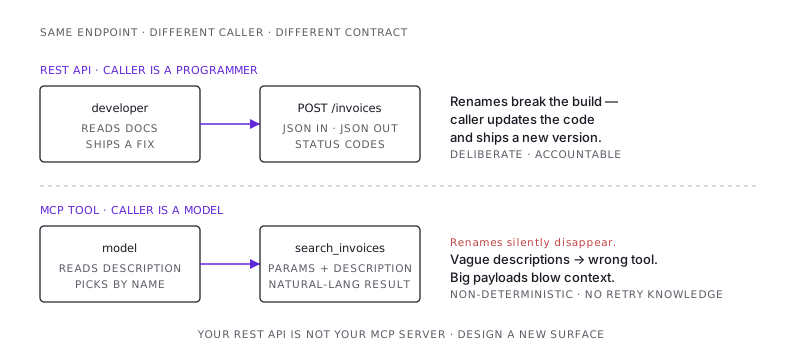
A REST API is designed for a programmer who reads docs, writes integration code, handles errors deliberately, and ships a deploy when the contract changes. An MCP tool is designed for a model that:
- Picks the tool based on its description. If your tool description is
"Get user data", the model will use it for anything that smells like a user. If your description is"Get a user's billing contact email by user ID. Returns null if the user has no billing contact. Does NOT return personal email — use get_user_profile for that."— the model will pick correctly. Description quality is API quality here. - Reads the response as natural language. A 500-row JSON dump is technically a successful response and operationally a disaster — the model will paste it into context, blow the window, and produce a worse answer than if you'd said "too many rows, narrow your query."
- Cannot read your changelog. If you rename a field, the model has no idea. The field is just gone next turn. Treat MCP tool shapes the way you'd treat a public API: additive change, no renames, deprecate before remove.
A correct mental model: an MCP server is a purpose-built surface for agent use, often sitting in front of the same services your REST API sits in front of, but designed for a different caller with different failure modes. Sometimes one tool maps to one endpoint. Often one tool composes several, returns a summary instead of a payload, and refuses queries that would return too much.
The shape of a good tool
After shipping a few of these, the tools I trust have five things in common:
- A verb-noun name.
search_invoices,cancel_subscription,get_payment_status. Notinvoices(what action?), notsubscriptionManager(what does it do?). The model uses the name as a signal alongside the description. - A description that tells the model when not to use it. Negative space matters.
"For cancelled subscriptions only. For active ones, use pause_subscription instead."saves a class of misuse. - A response envelope, not raw rows. Wrap results in
{ items, total, nextCursor, hint }. Thehintfield is for the model —"showing 20 of 4,213 matches; refine the query with date range or account_id to narrow". Yes, you write English to a machine. It works. - Idempotency where it matters. Anything that mutates state needs an
idempotency_keyparameter the model can pass through. The model will retry on partial failures. You decide what "retry" means before it does. - Errors that are instructions.
404is not enough.{"error": "not_found", "message": "No invoice with id INV-9931. Did you mean to search by customer email instead? Use search_invoices."}is what you ship. The model will follow the instruction.
The cheapest way to test a tool's description is to read it aloud and ask: "If I had only this paragraph and no source code, would I know when to call this and how to interpret the result?" If no, your tool will misfire.
Tools vs resources vs prompts — when to use which
This is the part most teams I've seen get wrong on the first pass.
Tools are for actions. Anything the model decides to do at runtime based on the user's intent. query_db, send_email, create_jira_ticket. Each call has parameters, returns a result, and may have side effects.
Resources are for context the model can read. A schema definition, a runbook, a customer record by ID. They're addressable (postgres://db/schema/orders), the client can list them, and the model reads them like files. Resources are not actions — there's no parameter for "what to do." If you find yourself making a resource that takes parameters and returns different things based on them, you wanted a tool.
Prompts are for reusable workflows the user invokes deliberately. Think slash commands. "summarize_incident" with parameters for incident ID and timeframe. The user picks the prompt; the model fills in the rest. Prompts are how you encode opinionated workflows your team runs all the time without hand-writing the same instruction every session.
A useful rule: if the agent should decide to call it, it's a tool. If the agent should be able to look it up, it's a resource. If the user should be able to invoke it by name, it's a prompt.
The auth question, which has only bad answers right now
Every MCP server has to answer: who is the caller, and what are they allowed to do?
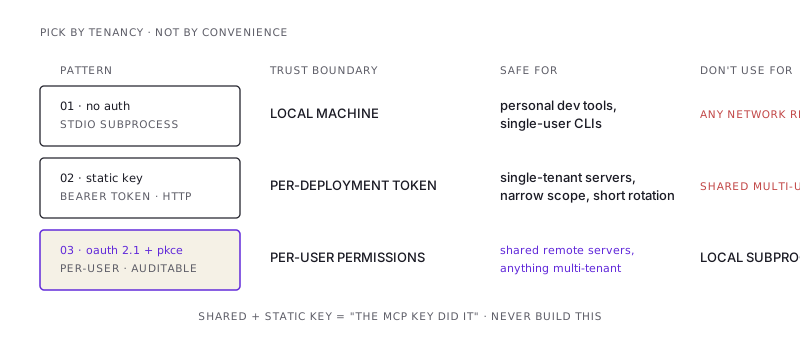
There are three patterns in use:
- No auth, local stdio only. Server runs as a subprocess of the agent host. Trust boundary is the local machine. Fine for personal tools, dangerous for anything multi-tenant.
- Static API key over Streamable HTTP. A bearer token in the header. Works. The trouble is that the agent now holds the token — and an agent that can read its own configuration can leak it through almost any path. Treat this as machine-to-machine credentials with a narrow scope and short rotation.
- OAuth 2.1 with PKCE, per-user. The spec direction. The agent host runs the OAuth flow, the user logs in, the server gets a per-user token, and every tool call is scoped to that user's permissions. This is the only model that scales to "shared MCP server, many users" and the only one that lets you audit "what did this person's agent do."
Pick OAuth if there's any chance the server will be shared. Pick static keys only if you're prepared to treat the server as a single-tenant deployment per consumer. Pick no-auth only for tools that run inside a developer's own machine and have no network reach.
The land mine is the middle case: a remote MCP server with a static key, used by multiple humans, where the audit trail says "the MCP key did it" and you can't tell which engineer's agent ran the destructive tool. Avoid building this.
Streaming, long-running work, and the cancellation problem
A REST call returns when it returns. An MCP tool call can take seconds, minutes, or stream incremental results as it works. Real-world tools fall into three buckets:
- Fast (<5s), synchronous request/response. Most lookups, simple writes. No special handling.
- Slow (5s–5min), with progress updates. Long queries, builds, deploys, batch operations. Use the protocol's progress notifications — the model shows the user that work is happening and won't time out.
- Async (>5min), kicked off and polled. Anything that runs longer than a typical session. The tool returns a job ID; a second tool checks status; a third tool fetches results. Don't try to hold an MCP call open for half an hour.
Whichever bucket a tool lives in, build cancellation in from day one. The user will close the agent host mid-call. The protocol delivers a cancellation; your server has to actually stop the work — kill the subprocess, abort the HTTP request, mark the job cancelled. Tools that ignore cancellation become silent background processes that keep mutating state after the user thought they were done.
Observability: the part everyone skips
When the agent does something wrong, two questions decide whether you can debug it:
- What did the agent see? The exact tool description, parameter schema, and response the model received — not your idealized version.
- What did the model decide? The tool calls in order, with arguments, with results, with timing.
Build both into the MCP server from day one. Log every request with: tool name, arguments (redact sensitive fields), response shape, response size, latency, caller identity, and a correlation ID that propagates from the agent host. Ship those logs somewhere queryable. The first time a user says "the agent gave me a wrong answer," the only way to find the bug is to replay the exact tool sequence with the exact inputs. Without logs, you're guessing.
A pattern that has saved me hours: log the full response the agent received, not just a summary. The bug is almost always that the response was technically correct but the model interpreted it wrong, and you can't see that unless you can read what the model read.
The Spring Boot / Node.js patterns I actually use
A few concrete patterns I've landed on after building MCP servers in both ecosystems:
Co-locate tool definitions with their handlers. Don't put schemas in one file and implementations in another. The schema is the documentation the model reads; if they drift, the model lies to itself.
server.registerTool(
  "search_invoices",
  {
    description: "Search invoices by customer email, date range, or status. " +
                 "Returns at most 25 results — use cursor to paginate. " +
                 "For a single invoice by ID, use get_invoice instead.",
    inputSchema: {
      type: "object",
      properties: {
        customer_email: { type: "string", format: "email" },
        date_from: { type: "string", format: "date" },
        date_to: { type: "string", format: "date" },
        status: { type: "string", enum: ["paid", "unpaid", "void"] },
        cursor: { type: "string" },
      },
    },
  },
  async (args) => {
    // Implementation right here. One screen away from the schema.
  },
);
Make the tool layer a thin wrapper over a service layer. The same business logic that powers your REST API should power your MCP tools. The MCP layer's only jobs are: parameter validation, response shaping, error translation. If you find yourself writing business logic inside a tool handler, extract it.
Cap response sizes early. Every list-returning tool should have a hard cap (I use 25 by default) and an honest hint when there's more. Models that get a 4,000-row response don't gracefully summarize it — they crash the context window and the next turn is incoherent.
Version the server, not the tools. When you have to break a tool's shape, ship a new tool name (search_invoices_v2) and deprecate the old one for a release before removing it. Don't try to gate behavior on a protocol version — agent hosts don't reliably reason about that.
What to expose first
If you're standing up your team's first MCP server, the temptation is to expose everything. Don't.
Start with three to five tools that cover the most common manual queries your team runs against the system. The ones where someone Slack-pings the on-call engineer to look something up. Those queries are well-understood, the response shapes are stable, and the value is immediate — the agent stops being a curiosity and starts saving someone's afternoon.
The exposure expands from there. Read-only first. Mutations only after you've watched the read-only tools in production for a few weeks and have a feel for how models actually use them. Destructive operations last, behind an explicit confirmation pattern (return a "preview" first, require a second call with a confirmation token to commit).
The shortest version
- MCP is a small protocol with a big design surface. The protocol is JSON-RPC; the work is what you expose and how.
- Tool descriptions are your API quality. Write them for a model that has only the description and no other context.
- Auth is the question with the worst answers — pick OAuth if the server will ever be shared, static keys only for single-tenant, no-auth only for local subprocesses.
- Cap response sizes, log everything the agent saw, build cancellation in from day one.
- Start with read-only tools that replace common Slack pings. Earn the right to ship mutations by watching the reads in production.
The interface you ship next year for your agents will be more critical than the interface you shipped this year for your frontends. Treat it like an API, not a hackathon project.
/share

Kishore K Sharma
Lead Full Stack Engineer | Java · Spring Boot · Distributed Systems · AWS | Building Scalable Cloud-Native Platforms