Squashing the Swiping Bug: A Deep Dive into Mobile Carousel Edge Cases
How to handle native browser momentum vs. custom JavaScript scroll snapping for a smooth, one-slide-at-a-time mobile carousel experience.
- #frontend
- #react
- #mobile
- #ux
- #javascript
Building a mobile image carousel seems simple until you test it on a real device. Suddenly, fast swiping causes the carousel to skip multiple images, bounce awkwardly, or get stuck between slides.
I recently encountered this exact issue while standardizing the mobile carousel across multiple components in an application. The goal was simple but critical: ensure smooth, strict single-slide transitions during fast swiping, regardless of how vigorously the user interacted with the screen.
Here is a deep dive into the problem, the investigation process, and the ultimate solution using React and a consistent touch-handling pattern.
The Problem: Native Momentum vs. React State
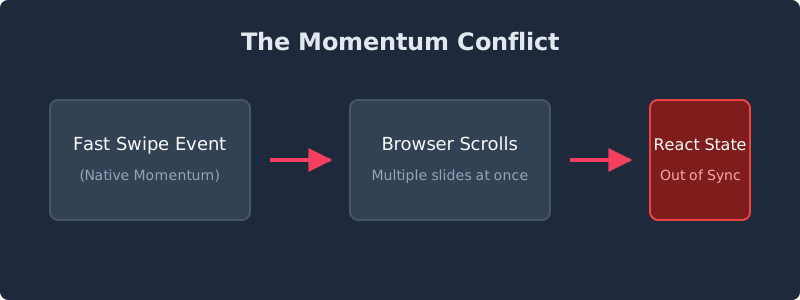
The core issue stems from the conflict between native browser momentum scrolling and our custom React state tracking. By default, iOS and Android browsers want to preserve momentum when a user swipes quickly.
If you are using CSS scroll-snap-type: x mandatory, the browser tries to snap to the nearest element after the momentum decelerates. However, if your React component relies on updating an active index state to display pagination dots or trigger lazy loading, the rapid scroll events generate a barrage of state updates. This leads to stale closures, skipped indices, and a generally chaotic user experience.
The Investigation
Initially, I tried debouncing the scroll event listener to limit how often the state updated. However, debouncing introduces an unacceptable visual lag; the UI felt heavy and unresponsive.
I also experimented with entirely disabling CSS scroll snapping and relying solely on a library like Framer Motion. While powerful, adding a heavy animation library just to manage a carousel felt like overkill for performance-critical mobile views.
The breakthrough came when I realized I needed a way to track the intended index separately from the current scrolling index. More importantly, I needed to override the native scrolling momentum entirely during programmatic transitions.
The Solution: intendedIndexRef and Programmatic Snapping
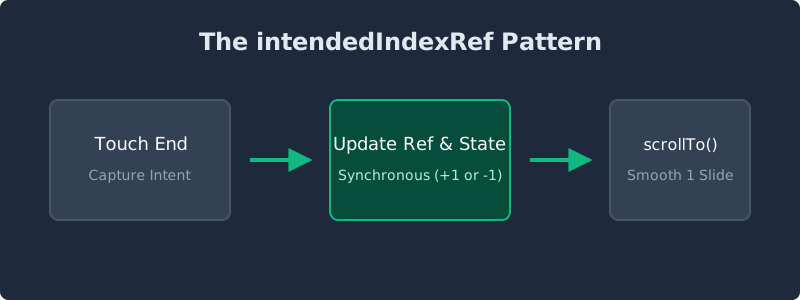
To enforce a strict one-image-at-a-time navigation, we need to bypass the browser's momentum and manually control the scroll position when a swipe gesture is detected.
Here is the pattern that finally worked perfectly:
- Track Intent Synchronously: Use a
useRef(e.g.,intendedIndexRef) to store the index the user is trying to reach. This bypasses React's asynchronous state batching, giving us synchronous, reliable access to the correct index inside fast-firing touch handlers. - Calculate Velocity and Direction: On
onTouchEnd, determine if the swipe was strong enough or traveled far enough horizontally to warrant a slide change. - Disable Scroll Snap Temporarily: During the programmatic scroll, temporarily remove the CSS
scroll-snap-typeto prevent the browser from fighting our JavaScript. - Execute the Transition: Update the
intendedIndexRef, set the React state, and programmatically scroll the container to the exact pixel offset.
The Implementation
Here is a streamlined version of the implementation that demonstrates the core logic:
import { useRef, useState, TouchEvent } from 'react';

export function Carousel({ images }: { images: string[] }) {
  const [activeIndex, setActiveIndex] = useState(0);
  const intendedIndexRef = useRef(0);
  const containerRef = useRef<HTMLDivElement>(null);
  const touchStartRef = useRef<number | null>(null);

  const handleTouchStart = (e: TouchEvent) => {
    touchStartRef.current = e.touches[0].clientX;
  };

  const handleTouchEnd = (e: TouchEvent) => {
    if (touchStartRef.current === null) return;

    const touchEnd = e.changedTouches[0].clientX;
    const swipeDistance = touchStartRef.current - touchEnd;

    // Threshold for a valid swipe (e.g., 50px)
    if (Math.abs(swipeDistance) > 50) {
      const direction = swipeDistance > 0 ? 1 : -1;

      // Calculate new index and clamp it to array bounds
      const newIndex = Math.max(0, Math.min(
        images.length - 1,
        intendedIndexRef.current + direction
      ));

      // 1. Update ref synchronously
      intendedIndexRef.current = newIndex;

      // 2. Update state for pagination UI
      setActiveIndex(newIndex);

      // 3. Programmatically snap to the correct element
      if (containerRef.current) {
         // Temporarily disable native snap fighting
         containerRef.current.style.scrollSnapType = 'none';

         const slideWidth = containerRef.current.clientWidth;
         containerRef.current.scrollTo({
           left: newIndex * slideWidth,
           behavior: 'smooth'
         });

         // Restore native snap after the transition completes
         setTimeout(() => {
           if (containerRef.current) {
             containerRef.current.style.scrollSnapType = 'x mandatory';
           }
         }, 300);
      }
    }

    touchStartRef.current = null; // Reset
  };

  return (
    <div
      ref={containerRef}
      className="flex overflow-x-auto snap-x snap-mandatory hide-scrollbar"
      onTouchStart={handleTouchStart}
      onTouchEnd={handleTouchEnd}
    >
      {images.map((src, i) => (
        <img key={i} src={src} className="snap-center w-full flex-shrink-0 object-cover" alt={`Slide ${i + 1}`} />
      ))}
    </div>
  );
}
The Results
By storing the committed index in a mutable reference (useRef), we eliminate the frustrating stale state bugs caused by rapid swiping. By programmatically triggering scrollTo and carefully managing the CSS scroll-snap properties, we enforce a strict single-slide transition that completely neutralizes chaotic native momentum.
This pattern successfully standardized the swipe behavior across the application. Not only did it eliminate the reported bugs, but it also delivered a predictable, premium mobile experience that feels deeply integrated yet completely under our control.
/share

Kishore K Sharma
Lead Full Stack Engineer | Java · Spring Boot · Distributed Systems · AWS | Building Scalable Cloud-Native Platforms
/seen in production